

Most WordPress site owners pick a focus keyword, drop it into their SEO plugin, and move on — never checking whether it actually drove traffic. That loop stays broken for months, sometimes years.
This guide closes it. We’ll cover how to choose a focus keyword intelligently (including how AI Overviews have changed which keywords are worth targeting), how to set it up correctly in WordPress, and how to confirm it’s working — using data you can see without ever leaving your dashboard.
In This Article:
[Add AIOSEO TOC block here]
What Is a Focus Keyword?
A focus keyword is the primary term or phrase that represents the central topic of a web page or piece of content. It’s used to optimize your content for search engines, so the page has the best possible chance of ranking for that term.
If you use WordPress, you can add a focus keyword to any post or page using an SEO plugin. The plugin then evaluates whether your content is actually optimized for that phrase — checking things like where the keyword appears, how often it’s used, and whether your title tag and meta description include it.
Focus keywords and secondary keywords work together. Your focus keyword is the main phrase you’re targeting. Secondary keywords are related terms — variations, synonyms, longer phrases — that help search engines understand the full context of your page and can bring in additional traffic from related searches.
On-page SEO — the practice of optimizing a specific page to rank for a target keyword — gets much easier when you start with a clear focus keyword. For a complete overview, see our guide on on-page SEO in WordPress.
How to Choose a Focus Keyword (Including the AI Overviews Era)
Keyword selection has changed in the last two years — not in its fundamentals, but in which keywords are actually worth your effort. The biggest shift: Google’s AI Overviews now answer many informational queries directly at the top of the results page, before a user ever clicks a link.
That doesn’t mean SEO is less important. It means the types of keywords that drive clicks have shifted.
Keywords That AI Overviews Have Changed
Purely definitional queries — “what is a bounce rate,” “what does CTR mean,” “define anchor text” — are increasingly answered by AI Overviews before anyone scrolls. These keywords still have search volume, but click-through rates have dropped because searchers get the answer without visiting a site.
If a keyword is purely “what is [thing],” treat it as a supporting topic rather than a standalone focus keyword. Include the definition in your content, but target a more specific, actionable phrase as your primary focus.
Keywords That Still Drive Real Traffic
Three keyword types have held up well against the AI Overview effect:
- Specific how-to queries — “how to set up focus keywords in WordPress” or “how to track keywords in Google Analytics” require step-by-step guidance that a summary can’t replace
- Transactional and comparison queries — “best keyword research tools,” “AIOSEO vs Yoast,” or “MonsterInsights pricing” — searchers want options and context, not a single answer
- Navigational and brand queries — people looking for a specific site or product; these have always been high-intent and remain so
If your target keyword falls into one of these three categories, it’s worth pursuing — even if an AI Overview appears for related queries.
How to Evaluate Search Intent Before Committing to a Keyword
Before you lock in a focus keyword, search for it in Google and look at the results page. Ask three questions:
- Is there an AI Overview? If yes and it fully answers the query, the keyword may drive impressions but few clicks. Look for a more specific variant.
- What type of content ranks on page one? If the results are mostly guides and tutorials, write a guide. If they’re product pages, a blog post probably won’t rank here.
- Can you realistically compete? If the top three results are from major media brands with thousands of backlinks, target a longer, more specific phrase you can actually win.
Search intent tells you what Google thinks a searcher wants. Matching that intent — rather than just matching the keyword — is what earns rankings. For a deeper dive, see our guide on how to master SEO search intent.
The AI Overviews Keyword Test
Before finalizing any focus keyword, Google it and check whether an AI Overview takes up most of the page. If it does, your target may drive impressions but few clicks. A more specific, actionable variant — “how to use focus keywords in WordPress” rather than “what is a focus keyword” — tends to convert better traffic.
Focus Keywords for Different Content Types
The right focus keyword depends heavily on what type of page you’re optimizing. A keyword that’s perfect for a blog post would be wrong for a product page, and vice versa. Here’s how to think about keyword selection by content type.
Blog Posts
Blog posts perform best with informational or how-to keywords — phrases where the searcher wants to learn something. Target phrases like “how to [do X],” “what is [Y],” or “[topic] tips and strategies.” These naturally support long-form content with multiple sections and internal links.
Volume can be modest (100–1,000 searches/month) if the intent match is strong and competition is low. A focused, well-optimized article at 500 searches/month will consistently outperform a broad, competitive keyword where you rank on page four.
Product Pages
Product pages need transactional keywords — phrases used by someone ready to buy. “Buy [product],” “[product name] price,” “[product] for [use case],” or “[product] reviews” all signal purchase intent.
Don’t use an informational keyword on a product page. Google will rank your competitors’ blog posts above your product page for those terms because the content type doesn’t match the search intent.
Service Pages
Service pages sit between informational and transactional. Good focus keywords for service pages tend to include the service type, location (if relevant), and an action — “[service] in [city],” “affordable [service] for [audience],” or “[service] agency.” Pair your focus keyword with a clear value proposition in the title tag to improve click-through rate from the search results.
Homepage
Most homepages rank best for brand-name queries and short, high-level category terms. Trying to rank your homepage for a narrow long-tail keyword usually doesn’t work — and can dilute the page’s authority. The homepage focus keyword should reflect your core brand promise, not a specific topic you cover in one article.
How to Use a Focus Keyword in WordPress: Step-by-Step
Once you’ve chosen a focus keyword, the next step is putting it to work inside WordPress. Here’s the full process from research through published, optimized content.
Step 1: Keyword Research
Start with a keyword research tool — there are good free and paid options available. Search for your topic and compare the results. You’ll typically see a range of keyword variations with different search volumes and difficulty levels.
Here’s a hypothetical example for a SaaS company writing about time management at work:
| Keyword Phrase | Est. Monthly Volume | Difficulty |
|---|---|---|
| time management at work | ~480 | Medium |
| how to manage time at work | ~170 | Low–Medium |
| time management tips for employees | ~110 | Low |
| why is time management important at work | ~90 | Low |
Hypothetical volume figures — use your own keyword research tool for real data.
“Time management at work” has the highest volume and covers the main topic broadly. We’d use it as the focus keyword, with the other phrases as secondary keywords to weave naturally throughout the article.
For a deeper dive into the research process, see our quick-start guide to keyword research for SEO.
For a list of tools, check out our roundup of the best keyword research tools.
Step 2: Install an SEO Plugin
To enter a focus keyword and get real-time optimization feedback inside WordPress, you’ll need an SEO plugin. The plugin we recommend is All in One SEO (AIOSEO).
Not only does AIOSEO scan your content and provide optimization feedback in real time, but it covers your entire site — XML sitemaps, schema markup, local SEO, WooCommerce SEO, and more — without requiring any coding.
For the rest of this tutorial, we’ll be using AIOSEO. If you use Rank Math instead, see the note in Step 4 below — the process is the same, just in a different panel.
Step 3: Enter Your Focus Keyphrase
Assuming you’ve written your post or page content, now you can enter your focus keyphrase. A keyphrase is simply a group of keywords that matches a query someone might type in Google — it can be two words or five.
If you have additional related phrases, add them in the Additional Keyphrases field as well. For instance, if our focus keyphrase is “time management at work,” we might add “how to manage time at work” as an additional keyphrase.
Open your WordPress post editor and scroll below the article content to the AIOSEO panel. Type your phrase into the Focus Keyphrase field.
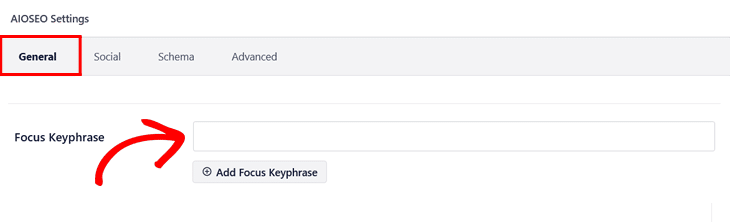
Once you’ve saved the keyphrase, AIOSEO immediately queues up its analysis — which takes us right into Step 4.
Step 4: Make Suggested SEO Updates
Once you’ve entered your focus keyphrase, AIOSEO analyzes your content and surfaces specific recommendations for improvement.
You’ll find these in the Focus Keyphrase box and in the Page Analysis panel just below it.
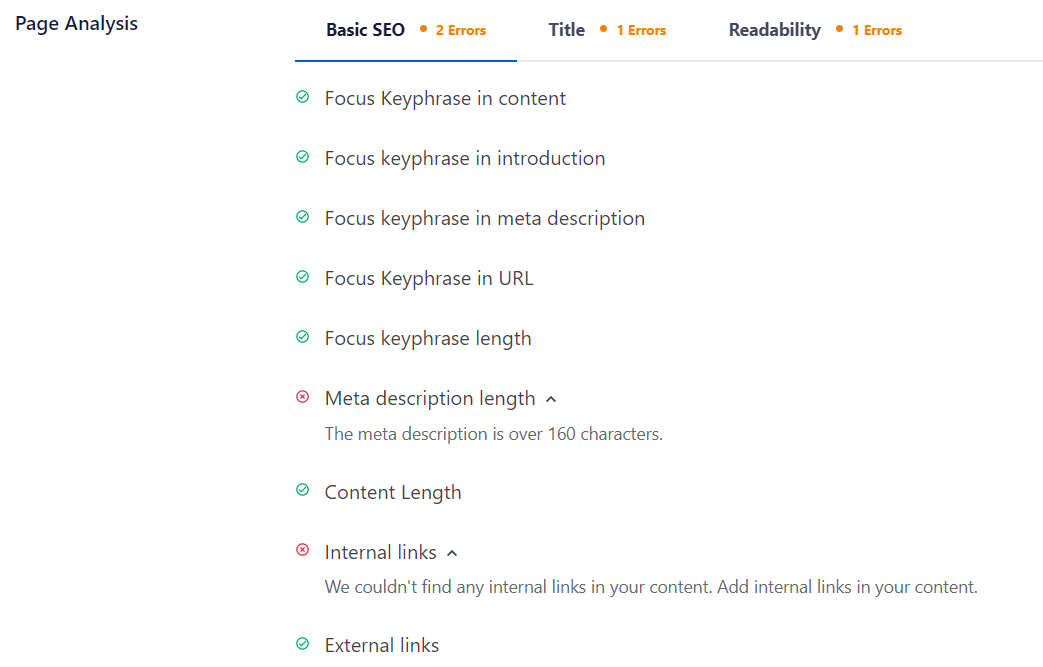
The Page Analysis panel has three tabs: Basic SEO, Title, and Readability.
Work through each one and address the flagged items. As you improve the content, your TruSEO Score will climb — giving you a quick at-a-glance measure of how well-optimized the page is.
That’s how you use focus keywords to analyze and optimize your content with AIOSEO.
If you’re using Rank Math instead, the same logic applies — enter your focus keyword in the Rank Math panel, and it will evaluate your content and surface similar recommendations.
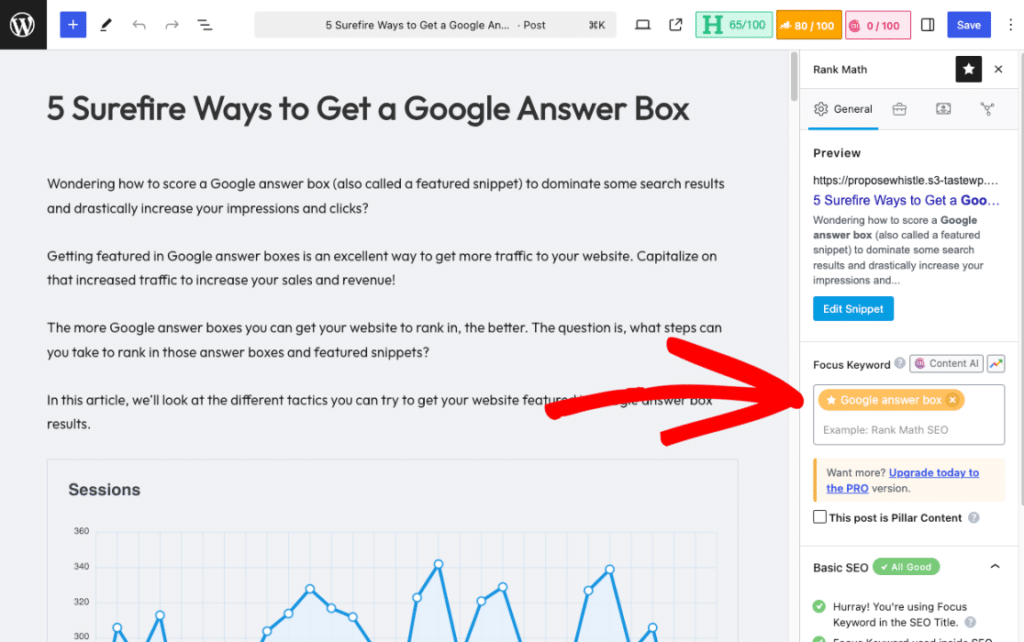
MonsterInsights supports focus keyword tracking for both AIOSEO and Rank Math. If Rank Math is your SEO plugin, our Rank Math focus keyword tracking guide walks through the full setup.
Two Focus Keyword Examples (Worked)
Theory is useful — examples make it concrete. Here are two worked scenarios, one for a blog post and one for a service page, to show how the same process plays out for different content types.
Example 1: Blog Post — SaaS Company Writing About Time Management
Let’s say you run a payroll software company serving small-to-mid-size businesses. You want to write an article about time management at work — a topic your target audience (HR managers, team leads) genuinely cares about.
A keyword research tool shows several phrase variations. “Time management at work” has the highest volume (~480/month) and manageable competition for a mid-size SaaS blog. The query intent is informational — people want tips and strategies, which matches a long-form guide perfectly. That becomes the focus keyword.
The related phrases — “how to manage time at work,” “time management tips for employees” — become secondary keywords. They’ll appear naturally throughout the article and can bring in additional long-tail traffic without cannibalizing the primary target.
In AIOSEO, the focus keyphrase goes into the Focus Keyphrase field. The TruSEO analysis flags that the phrase is missing from the first paragraph. We add it naturally in the introduction and address the other suggestions. The TruSEO Score moves from 58 to 82. The post goes live fully optimized — and we can track whether it’s actually sending traffic using the process in the next section.
Example 2: Service Page — Local Accountant Targeting a City-Based Query
We’ve seen this pattern work well for service-based businesses. A small accounting firm in Denver wants to rank for new client searches in their area. The obvious target is “accountant Denver” — but it’s highly competitive, dominated by directories and national platforms.
A more specific keyword like “small business accountant Denver” has lower volume (~100–150/month) but far more achievable competition and clearer commercial intent. The searcher wants to hire someone — not read a guide.
The service page focus keyword becomes “small business accountant Denver.” The page title, first heading, first paragraph, and meta description all include that phrase naturally. AIOSEO’s TruSEO analysis confirms placement is correct. The page also gets local business schema added via AIOSEO’s Schema Generator, which improves eligibility for local map pack results.
The key difference between these two examples isn’t just the topic — it’s the intent. Transactional keywords belong on service and product pages. Informational keywords belong in guides. Getting this right is one of the highest-leverage things you can do for your overall SEO.
How to Track Whether Your Focus Keywords Are Working
Setting a focus keyword and optimizing your content is only half the job. The part most site owners never get to is confirming whether those keywords are actually driving sessions to their site.
MonsterInsights connects GA4 to your WordPress dashboard and includes a Custom Dimensions Report at the Pro tier.
One of the dimensions you can track is your AIOSEO (or Yoast SEO or Rank Math) focus keyphrase — so you can see which focus keywords are sending real traffic, and which ones aren’t pulling their weight.
Step 1: Install the Dimensions Addon
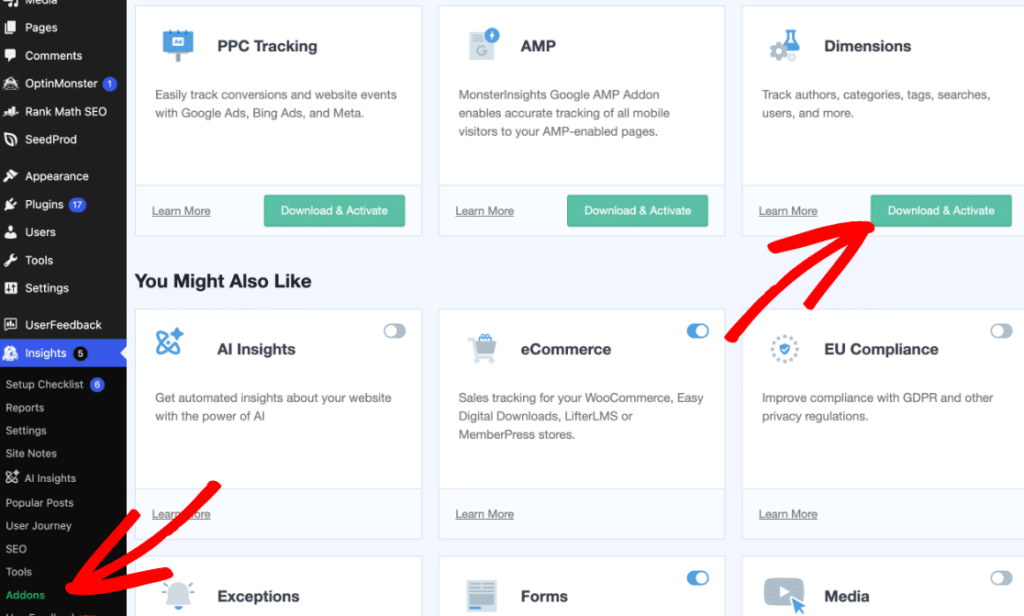
Focus Keyword Tracking is not automatic after installing MonsterInsights Pro. You need to install and activate the Dimensions Addon first, then enable the specific dimension you want to track.
Go to Insights → Addons in your WordPress dashboard, find the Dimensions Addon, and click to download and activate it.
Once it’s active, go to Insights → Settings → Conversions and enable the Focus Keyword dimension for your SEO plugin (AIOSEO, Yoast SEO, or Rank Math).
After enabling the dimension, MonsterInsights will start sending each post’s focus keyword to GA4 as a custom parameter with each session. The report populates over the next 24–48 hours as traffic comes in.
Step 2: View the Focus Keyphrase Report
Go to Insights → Reports → Dimensions. You’ll see a card labeled Focus Keyphrase (AIOSEO) — or the equivalent for your SEO plugin. It shows each focus keyword you’ve set across your posts and the number of sessions each has generated.
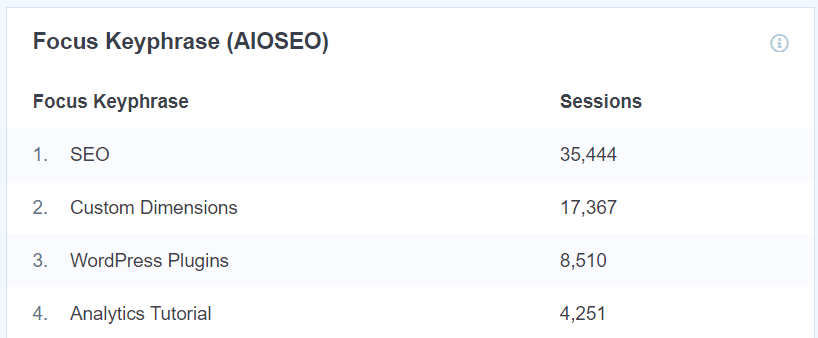
This report tells you which focus keywords are actually working — not just which ones you’ve set.
If a focus keyword has been live for several months and shows zero sessions, that’s your cue to investigate: check whether your page ranks in Google Search Console, whether the keyword has sufficient search demand, and whether the content fully matches the search intent.
A quick note on what this report shows: it displays sessions attributed to pages that have that focus keyword set in your SEO plugin.
It does not show which Google search terms visitors used — that data comes from the MonsterInsights Search Console report. Both reports together give you the full picture.
For a complete walkthrough of custom dimensions setup, see our beginner’s guide to custom dimensions in Google Analytics.
See Which Focus Keywords Are Actually Driving Traffic
MonsterInsights Pro includes the Custom Dimensions Report with Focus Keyword Tracking. Connect your AIOSEO, Yoast SEO, or Rank Math focus keyword data to GA4 and see which keywords are sending real sessions to your site — right inside your WordPress dashboard.
Get MonsterInsights ProVideo Tutorial: How to Use Focus Keywords in WordPress
If you’d rather see the process in action, this video covers the full workflow from research to a published, optimized post.
FAQs About Focus Keywords
How do I choose the right focus keyword?
Focus on three factors: search volume (how many people look for it), competition (how hard it is to rank for), and intent match (does the keyword describe what your page actually covers?). Use a keyword research tool to compare options. The best focus keyword has manageable competition, meaningful volume, and matches the type of content you’re publishing — informational for guides, transactional for product or service pages.
Can I use more than one focus keyword per page?
Each page should have one primary focus keyword that the entire page is optimized around. Additional related phrases belong in the Additional Keyphrases field in AIOSEO (or the equivalent in Rank Math) — these act as secondary targets rather than competing primaries. Trying to optimize a single page for two unrelated primary keywords typically weakens both and confuses both Google and the reader.
Where should I include my focus keyword in the content?
Include your focus keyword in the page title, the first heading, the first paragraph, the URL slug, and your meta description. Use it naturally throughout the body copy — AIOSEO will flag if it’s underused or missing from key locations. Avoid forcing it into headings where it doesn’t flow naturally; clear, descriptive headings almost always outperform keyword-stuffed ones.
How do I optimize my content for a focus keyword without keyword stuffing?
Write for the reader first. Use your focus keyword where it appears naturally — in the title, introduction, key headings, and a few times throughout the body. Fill the rest of your content with related terms and synonyms that Google understands as topically relevant. AIOSEO’s TruSEO analysis will flag if keyword density is too low or placement is off. A well-written page that genuinely answers a question will always outperform one that mechanically repeats a keyword.
How often should I re-evaluate my focus keywords?
Review your focus keywords at least once or twice a year using Google Search Console. Look for pages ranking in positions 11–20 — those are your fastest opportunities to improve with a content update or added backlinks. One extra consideration: if Google’s AI Overviews are answering your target keyword with a summary panel, your click-through rate may have dropped even if your ranking held. That’s a signal to consider targeting a more specific, longer variant of the phrase.
What is the difference between a focus keyword and a long-tail keyword?
A focus keyword is the primary phrase you’re optimizing a specific page for — it can be short (two words) or long (four or five words). A long-tail keyword is a longer, more specific search phrase that tends to have lower volume but higher purchase or action intent. Long-tail keywords make excellent focus keywords for newer sites or competitive topics because they’re easier to rank for. See our guide on long-tail keywords in SEO for how to find and use them.
Can I track focus keyword performance in Google Analytics?
Yes — with MonsterInsights Pro and the Dimensions Addon enabled. Once you activate the Focus Keyword dimension in the addon settings, MonsterInsights sends each post’s AIOSEO (or Yoast SEO or Rank Math) focus keyword to GA4 as a custom parameter. You can then view sessions per focus keyword in the Custom Dimensions Report inside your WordPress dashboard. This shows which focus keywords are generating actual traffic — not just which ones you’ve set.
Now you know how to choose, set up, and track focus keywords on your WordPress site. Here are some related guides to keep the momentum going:
- How to Add SEO Keywords to WordPress (The Best Way)
- On-Page SEO in WordPress: Your Complete Guide
- WordPress SEO Checklist: Simple Steps
- How to Master SEO Search Intent to Improve Your Rankings
- How to Add Google Search Console to WordPress and Analytics
- Best Ways to Measure SEO Performance in Google Analytics
Follow us on Twitter, Facebook, and YouTube for more Google Analytics tips.