


When you’re looking for a Google Analytics plugin for WordPress, chances are you’ve seen both GA Google Analytics and MonsterInsights in your search results. Wondering which one you should use to set up tracking?
While GA Google Analytics and MonsterInsights both connect your website with Google Analytics, that’s just about where the similarities end. In fact, they’re distinctly different plugins when you examine their features, functionality, and how they present your analytics data.
In this comparison, I’ll go over the main features of both plugins and explain their key differences. By the end, you’ll have all the information you need to decide which plugin will work better for your WordPress site.
In This Article:
- GA Google Analytics vs. MonsterInsights: Overview
- GA Google Analytics and MonsterInsights: The Key Differences
- GA Google Analytics vs. MonsterInsights: Quick Comparison Table
- Detailed Comparison: MonsterInsights vs. GA Google Analytics
- Why Choose GA Google Analytics?
- Why Choose MonsterInsights?
- MonsterInsights vs. GA Google Analytics: Which One Is Right for You?
- FAQs About MonsterInsights vs. GA Google Analytics
GA Google Analytics vs. MonsterInsights: Overview
To start, I’ll give you a brief overview of each plugin. Let’s take a look.
About GA Google Analytics
GA Google Analytics is a lightweight, fast, free plugin that connects your WordPress site with Google Analytics without requiring any code. It focuses on doing one thing well: adding the Google Analytics tracking code to your site.
The plugin also offers a Pro version with additional features like a visitor opt-out box, the ability to disable tracking for logged-in users, and support for multiple tracking codes.
About MonsterInsights (Google Analytics Dashboard for WordPress)
MonsterInsights is the most popular Google Analytics plugin for WordPress, with over 3 million active installations. It not only connects your WordPress site to Google Analytics with just a few clicks but also provides advanced tracking features beyond standard Google Analytics capabilities.
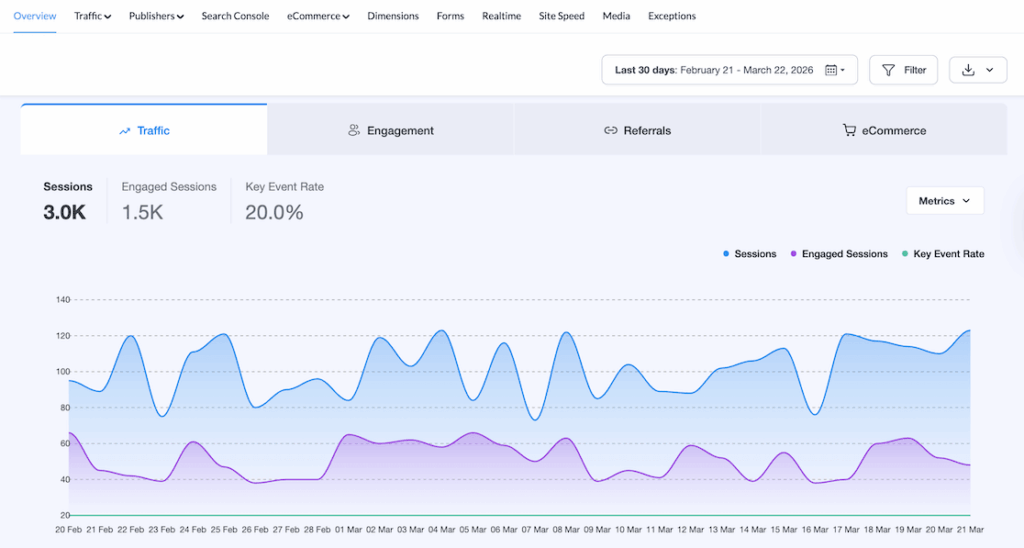
Plus, MonsterInsights brings your analytics data directly into your WordPress dashboard with easy-to-understand reports, eliminating the need to constantly switch between WordPress and Google Analytics.
Now that you’ve read the overview of each plugin, you can probably already see the big differences between the two!
GA Google Analytics and MonsterInsights: The Key Differences
The free versions of both plugins will quickly and easily install your Google Analytics code on your website. From there, they’re significantly different.
The biggest difference between GA Google Analytics and MonsterInsights is the stats dashboard. GA Google Analytics helps you set up GA4 and lets you use the GA4 dashboard to find your data. MonsterInsights, on the other hand, helps you set up GA4 and brings a bunch of that data into your WordPress dashboard.
So, your choice between these Google Analytics plugins will largely depend on the additional features you need and whether you want your analytics data presented within your WordPress dashboard in easy-to-read reports.
GA Google Analytics vs. MonsterInsights: Quick Comparison Table
Here’s the full feature breakdown at a glance:
| Feature | GA Google Analytics | MonsterInsights |
|---|---|---|
| Setup | Manual Measurement ID entry | Google account authentication wizard |
| In-WP Dashboard | None — must use GA4 directly | Full reports inside WordPress |
| Advanced Tracking | Limited (Pro adds a few extras) | Scroll depth, downloads, affiliate links, video |
| eCommerce Tracking | Requires custom code or GTM | 1-click WooCommerce setup (Pro) |
| Form Conversion Tracking | Not included | WPForms, Gravity Forms, CF7, and more (Pro) |
| AI Features (Charlie Chat) | None | All plans including Lite |
| Privacy / GDPR | No built-in tooling | Privacy Guard + EU Compliance Addon (Plus+) |
| Support | WordPress.org forum (community) | Standard / Priority / Premium (by plan) |
| Price | Free / $20/year Pro | Free Lite / $99.50–$299.50/year paid |
Detailed Comparison: MonsterInsights vs. GA Google Analytics
Let’s dive deeper into the specific features and capabilities of each plugin to help you make an informed decision.
1. Installation and Setup
The first step in using any analytics plugin is getting it installed and configured properly. Both plugins aim to simplify this process, but they take somewhat different approaches.
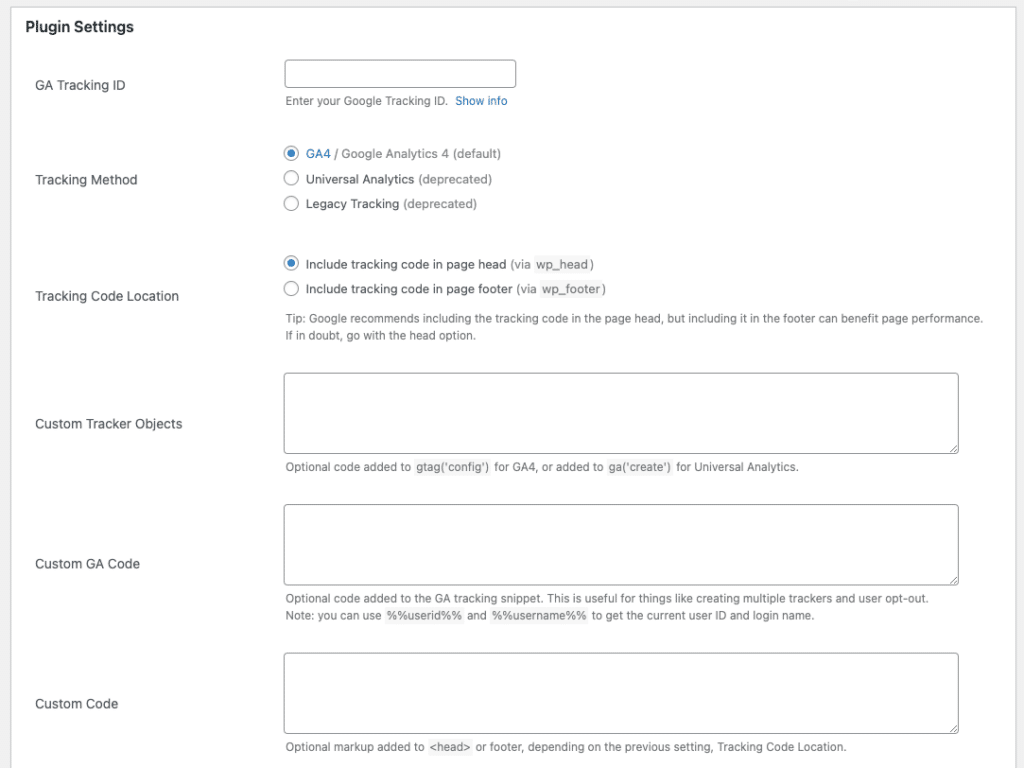
GA Google Analytics:
- Simple and straightforward setup
- Free Google Analytics installation
- Lightweight plugin that adds minimal load to your site
- Options to place tracking code in header or footer
- Basic customization options for tracking code
Here’s a look at the GA Google Analytics settings dashboard:
MonsterInsights:
- User-friendly setup wizard
- Easy authentication with Google Analytics
- No need to manually copy/paste tracking codes
- Options to exclude specific user roles from tracking
Here’s the MonsterInsights setup wizard:
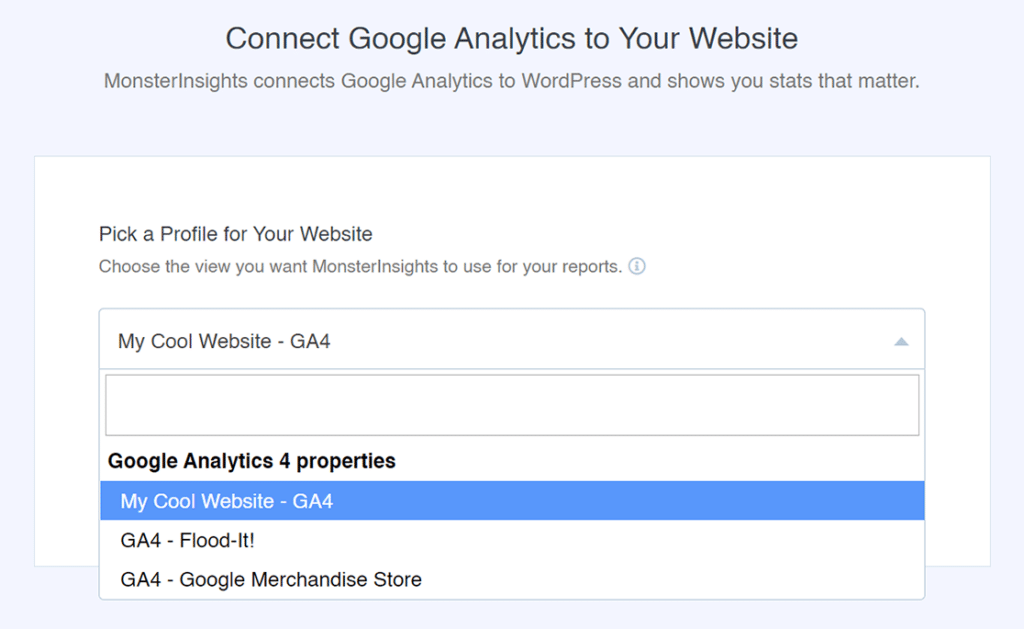
The wizard handles the Google account connection and GA4 property selection — no Measurement ID to copy, no tracking code to paste.
2. Analytics Dashboard
Once your tracking is set up, it’s time to see and analyze your data. This is where the two plugins differ a lot.
GA Google Analytics:
- No built-in analytics dashboard
- You must visit your Google Analytics account to view data
- Requires learning the Google Analytics interface
- No simplified reports in WordPress
MonsterInsights:
- Comprehensive analytics dashboard within WordPress
- Easy-to-read reports on traffic, referral sources, popular content, and much more
- Real-time stats accessible directly in WordPress
- Dashboard widgets for quick analytics overview
- Date range selector for viewing historical data
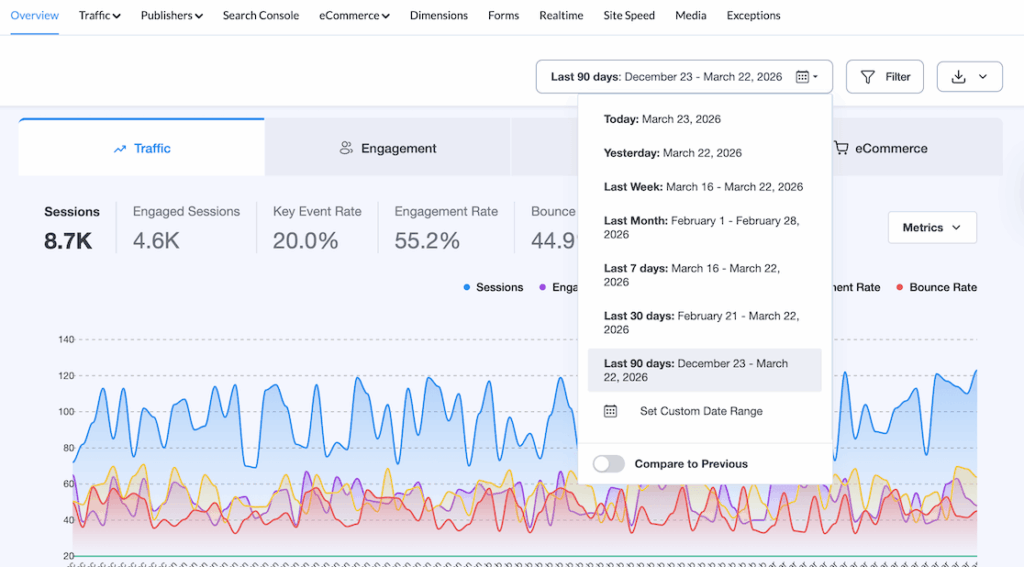
Having your top pages, traffic sources, and audience data visible inside WordPress means you actually check it — most site owners look at GA4 far less often once they have to navigate there separately.
3. Advanced Tracking Features
Basic pageview tracking is just the beginning. To get truly valuable insights, you might need more advanced tracking capabilities. The plugins offer different levels of functionality in this area.
GA Google Analytics:
- Basic tracking capabilities
- Limited advanced features in the free version
- The pro version adds more tracking options, like enabling tracking on your login page, excluding logged-in users, and displaying an opt-out box
- Requires custom code for most advanced tracking scenarios
MonsterInsights:
- Advanced tracking features even in the free version
- Automatic tracking of outbound links, downloads, and affiliate links
- Site Notes feature to keep track of marketing campaign dates, website updates, content publish dates, and more
- Media tracking for videos and other media (Plus version)
- GDPR settings (Plus version)
- eCommerce tracking for online stores (Pro version)
- Form conversion tracking (Pro version)
- Custom dimension tracking for advanced data analysis (Pro version)
- Scroll depth tracking, telephone link tracking, and more
Most of these activate automatically on install — no code, no GTM setup.
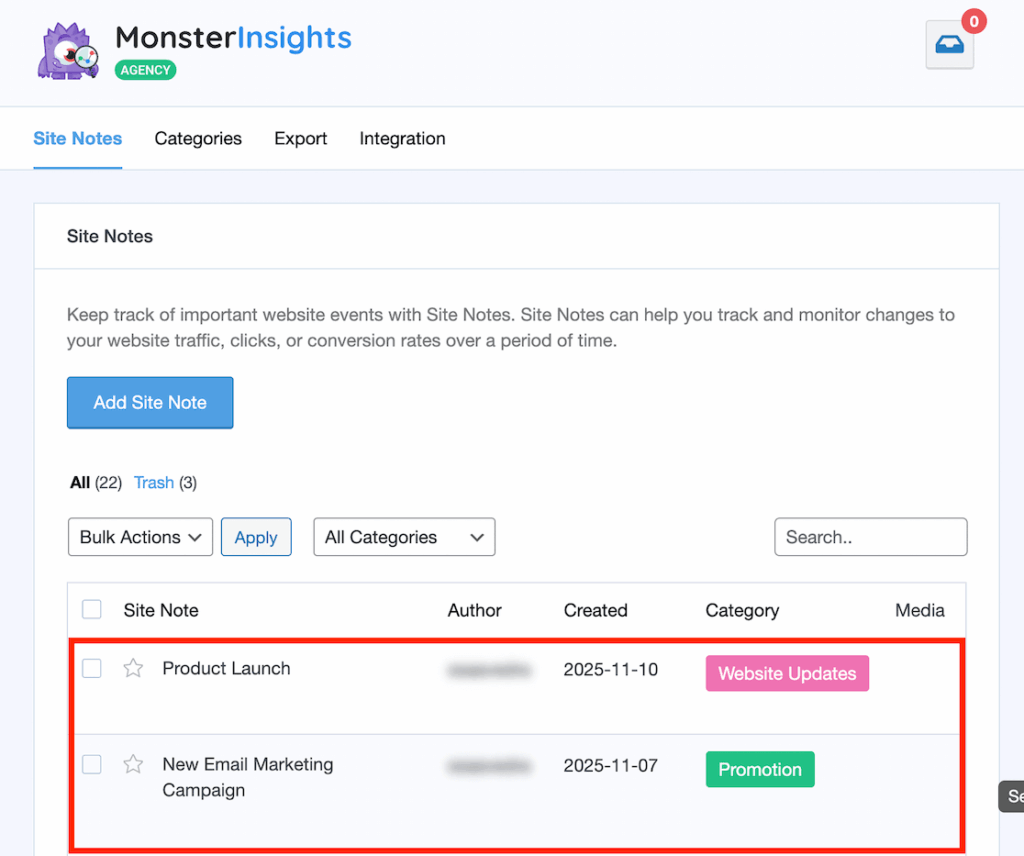
For GA Google Analytics, anything beyond standard pageview tracking requires custom configuration or a separate plugin.
4. AI-Powered Analytics Features
MonsterInsights 10.2 introduced Charlie Chat — a conversational AI assistant built directly into the MonsterInsights dashboard. There’s no equivalent feature in GA Google Analytics.
The premise is straightforward: instead of building a report or navigating GA4 to answer a question about your data, you just ask.
Charlie Chat connects directly to your GA4 data and responds in plain English with period comparisons, specific numbers from your actual analytics, and recommended next steps.
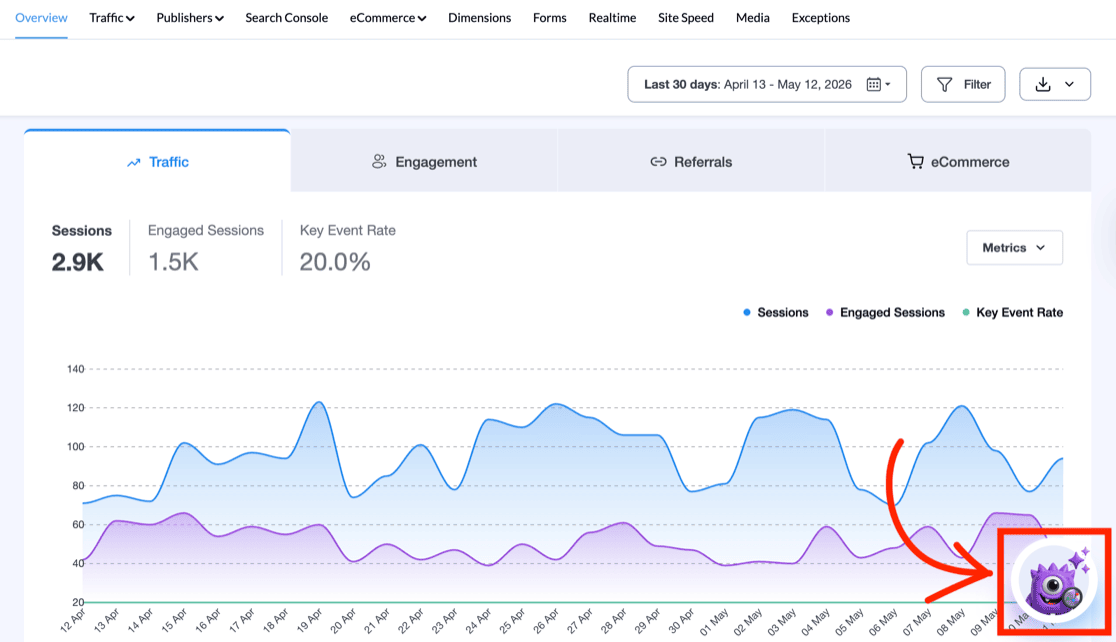
To open it, look for the Charlie icon in the bottom right corner of the MonsterInsights Reports screen.
When you open it, you’ll see suggested starter questions — things like “How many visitors did I get this week?” or “How are my sales doing?” — alongside a plain-text input where you can type your own questions.
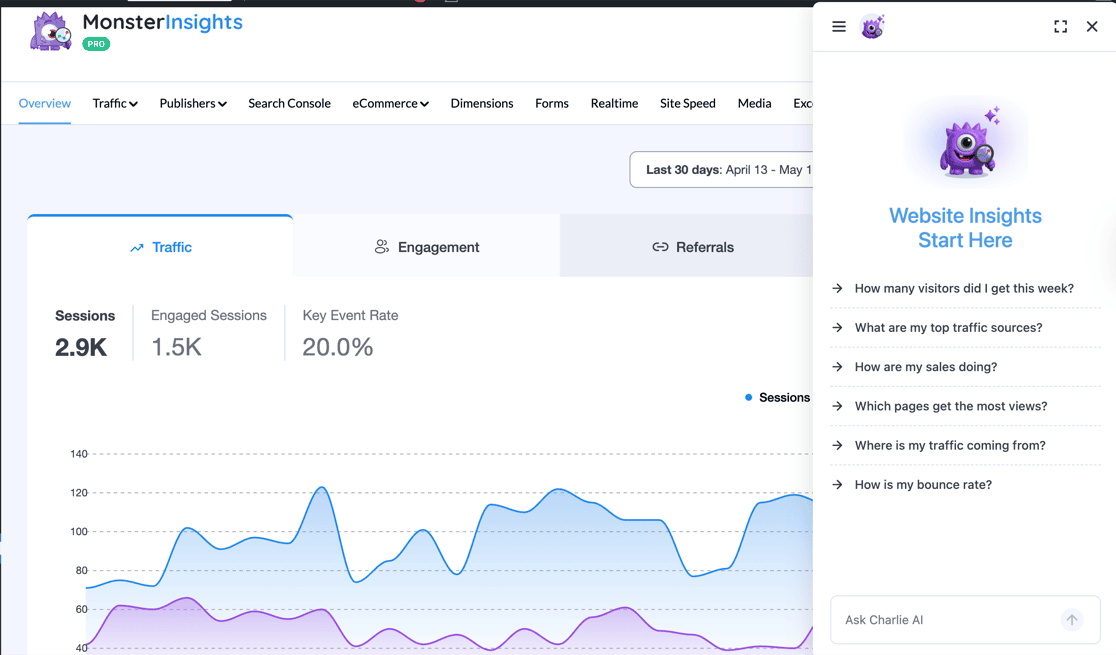
Charlie Chat is available on all MonsterInsights plans, including the free Lite version.
It replaces two earlier AI features — AI Insights and AI Conversations — bringing both into a single, faster experience.
Ask Your Analytics Anything
Charlie Chat is available to all MonsterInsights users including Lite. Ask questions about your traffic, SEO, or sales and get specific answers from your real GA4 data — no report building required.
Try MonsterInsights Free5. eCommerce Tracking
For online store owners, tracking sales and customer behavior is essential. The plugins vary significantly in how they handle eCommerce analytics integration.
GA Google Analytics:
- Requires additional setup for detailed eCommerce analytics
- May need developer assistance for proper implementation (you’ll need to add code)
MonsterInsights:
- One-click eCommerce setup for WooCommerce, Easy Digital Downloads, and other popular eCommerce plugins
- Detailed dashboard eCommerce reports showing conversion rates, average order value, and top products
- eCommerce funnel report
- User journey report
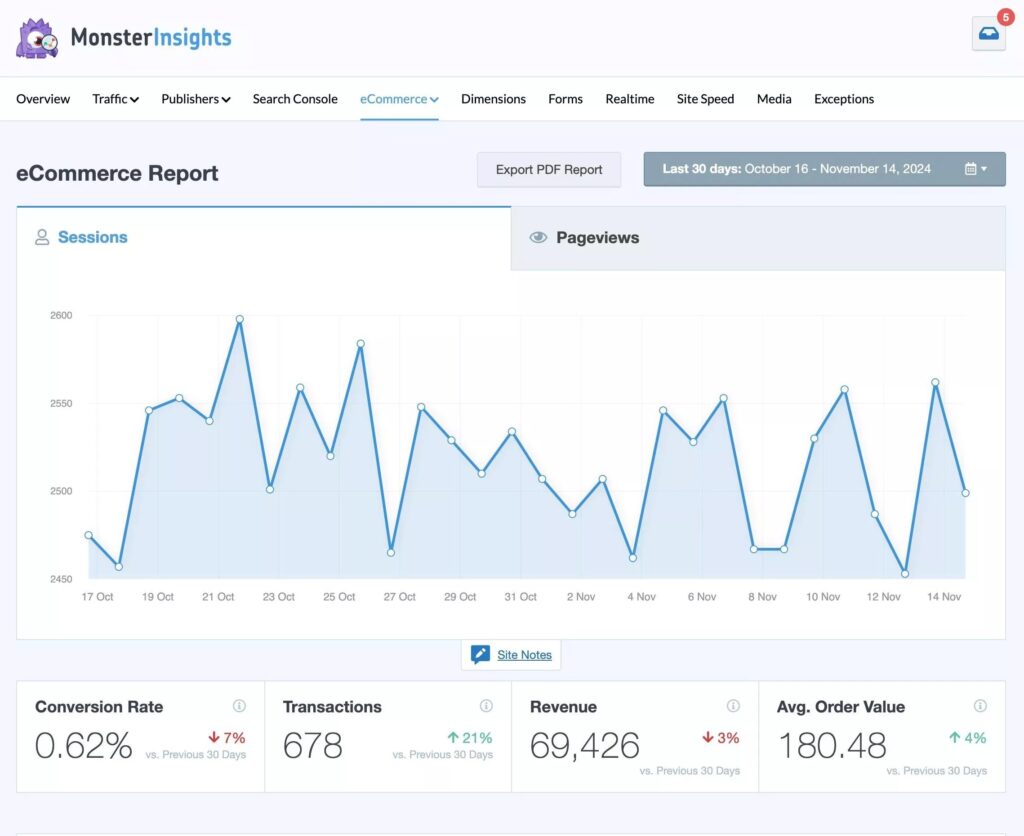
For WooCommerce store owners, this alone makes MonsterInsights worth it. Revenue, conversion rates, and top products are available with a single toggle — no developer help needed to get enhanced eCommerce tracking working properly.
6. Privacy and GDPR Compliance
If your site has visitors from the EU, privacy compliance isn’t optional.
GA Google Analytics doesn’t include any built-in privacy tooling. You’re responsible for configuring GA4 data retention settings, consent mode, and PII protection separately — typically through additional plugins or custom code.
MonsterInsights includes two dedicated privacy features starting on the Plus plan. Privacy Guard automatically prevents personally identifiable information from being sent to Google Analytics — things like email addresses and user IDs that can slip into your data accidentally.
The EU Compliance Addon provides broader support for GDPR, CCPA, and other privacy regulations.
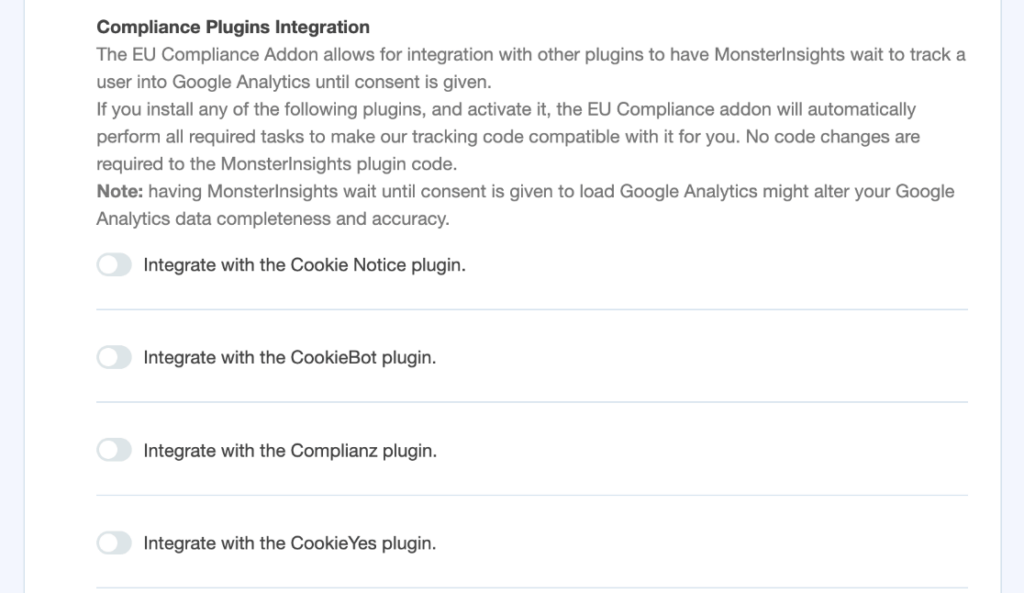
For a complete overview of keeping PII out of Google Analytics, we have a dedicated guide.
I’d flag this as a meaningful advantage for MonsterInsights if you have any EU audience at all. Privacy compliance problems don’t announce themselves — you typically find out after the fact.
7. Integrations
Modern websites often use multiple tools and platforms that need to work together. The ability to integrate with other services can extend the functionality of your analytics solution.
GA Google Analytics:
- Primarily focused on Google Analytics integration
- Limited integration with other tools
MonsterInsights:
- Integrates with multiple Google tools (Search Console, Google Ads)
- Works with social media platforms like Meta (Facebook)
- Connects with WordPress form plugins for tracking form submissions
- Integrates with popular SEO plugins like All in One SEO, Yoast, and Rank Math
- Can integrate with Pretty Links for easy affiliate link tracking
- Integrates with popular WordPress eCommerce and membership plugins
The Search Console integration is a good example of how these work in practice: your top search queries surface directly in the MonsterInsights dashboard, so you can do a quick keyword check without opening Search Console separately.
8. Support
GA Google Analytics is a free plugin maintained by Jeff Starr. Support runs through the WordPress.org support forum — community-based, no guaranteed response times.
MonsterInsights offers tiered paid support:
- Standard Support (Plus): email support with standard response times
- Priority Support (Pro): faster response queue and more detailed troubleshooting
- Premium Support (Elite): highest priority access
For business sites where analytics tracking is mission-critical, the difference between community forum support and a dedicated support team is worth factoring into your decision.
9. Pricing
GA Google Analytics is free. The Pro version — which adds login page tracking, user tracking exclusions, and an opt-out box — is $20/year for a single site. That’s the full pricing structure.
MonsterInsights has a free Lite version on WordPress.org with essential tracking. The paid plans are:
- Plus — $99.50/year (1 site): Standard reports, EU Compliance Addon, Privacy Guard, Popular Posts, email summaries
- Pro — $199.50/year (5 sites): Everything in Plus, plus eCommerce tracking, form conversion tracking, custom dimensions, User Journeys, and all major integrations
- Elite — $299.50/year (5 sites): Everything in Pro, plus multisite support, advanced access control, client license management, and UserFeedback Elite
The price gap is real. If you need basic tracking and are comfortable in GA4, GA Google Analytics at $0 or $20/year is hard to beat on cost. If you need WooCommerce tracking, in-WordPress reporting, or privacy compliance tooling, MonsterInsights Pro at $199.50/year is where the relevant features live.
Why Choose GA Google Analytics?
GA Google Analytics is a genuinely good plugin for a specific kind of user. It’s lean, well-maintained, and does exactly what it says. I’d recommend it if all of the following are true for you:
- You’re comfortable in the GA4 interface and check it regularly
- You don’t need eCommerce tracking, form tracking, or custom dimension reports
- Site performance is a priority and you want the absolute minimum plugin footprint
- You’re a developer who prefers to configure tracking manually or through GTM
For developers managing client sites or technical users who live inside GA4, it’s a clean, dependable choice. The $20/year Pro upgrade is also the best value in this entire comparison if the extra features it adds are the ones you need.
Why Choose MonsterInsights?
MonsterInsights is the better fit for the vast majority of WordPress site owners — particularly anyone who isn’t spending time in GA4 regularly or who needs tracking beyond basic pageviews.
The core reasons to choose MonsterInsights, the WordPress analytics plugin, are:
- You want your data where you work. The in-WordPress dashboard means you don’t need to open GA4 to stay on top of your site’s performance.
- You run a WooCommerce store. One-click eCommerce tracking that would otherwise require a developer is one of the strongest arguments for MonsterInsights Pro.
- You need plain-English answers about your data. Charlie Chat turns your GA4 data into actionable answers in seconds — without building a single report.
- You have EU visitors. Privacy Guard and the EU Compliance Addon handle GDPR and CCPA requirements without additional configuration.
- You use forms for lead gen. Knowing which forms convert and which ones don’t is data most business sites need and GA4 won’t surface for you automatically.
- You want advanced tracking without writing code. Scroll depth, affiliate link tracking, video engagement, and more activate automatically on install.
I’ve found that the single biggest predictor of whether someone actually uses their analytics data is whether they can see it without friction. MonsterInsights removes that friction entirely.
Get Your Analytics Inside WordPress
MonsterInsights connects your WordPress site to GA4 and brings your most important reports — traffic sources, top pages, eCommerce, forms — directly into your dashboard. Plus Charlie Chat answers your analytics questions in plain English.
See MonsterInsights PlansMonsterInsights vs. GA Google Analytics: Which One Is Right for You?
If your goal is to get a GA4 tracking code on your site and you’re happy working inside GA4’s own interface, GA Google Analytics does that job well. It’s lightweight, free, and maintained by a solid developer. There’s nothing wrong with it for that use case.
If your goal is to actually understand what’s happening on your site — without spending time learning GA4, without switching tabs, without writing custom tracking code — MonsterInsights is the better choice. That’s true whether you’re running a content blog, a WooCommerce store, a lead gen site, or a membership platform.
The honest version of the recommendation: GA Google Analytics is right for developers and technical users who prefer a minimal footprint and work in GA4 directly. MonsterInsights is right for everyone else — and that’s the majority of WordPress site owners.
If you’re not sure which fits your situation, the free Lite version of MonsterInsights is a reasonable starting point. Install it, connect your GA4 property, and see whether the in-WordPress dashboard actually changes how often you look at your data. If it does, the paid plans give you the full feature set.
If you prefer the raw GA4 interface, GA Google Analytics will serve you well at a fraction of the cost.
The Bottom Line
GA Google Analytics installs the tracking code and gets out of your way — ideal for developers who prefer working in GA4 directly. MonsterInsights installs the tracking code and also gives you the dashboard, the reports, the eCommerce tracking, and now Charlie Chat. For most WordPress site owners, the extra capability is the whole point.
FAQs About MonsterInsights vs. GA Google Analytics
Is MonsterInsights the same as Google Analytics?
No — MonsterInsights is a WordPress plugin that connects your site to Google Analytics 4. GA4 is the actual analytics platform that collects and stores your data. MonsterInsights handles the connection and then surfaces that GA4 data inside your WordPress dashboard in plain-English reports. You need a Google Analytics account to use MonsterInsights; the two work together rather than as alternatives to each other.
Does MonsterInsights work without Google Analytics?
No. MonsterInsights requires a Google Analytics 4 property. It connects to GA4, pulls data from it, and displays that data in your WordPress dashboard. Without a GA4 connection, the plugin has no data source to read from. Setting up a GA4 property is free and takes a few minutes — our Google Analytics setup guide walks through the full process.
Is GA Google Analytics plugin free?
Yes, the core GA Google Analytics plugin is free and available on WordPress.org. There’s also a Pro version at $20/year for a single site that adds features like login page tracking, user role exclusions, and an opt-out box. The free version handles standard GA4 tracking for most use cases.
Which is better for WooCommerce: MonsterInsights or GA Google Analytics?
MonsterInsights is significantly better for WooCommerce. It includes one-click enhanced eCommerce tracking on the Pro plan, which activates revenue tracking, conversion rate reporting, average order value, top products, and top traffic sources driving sales — automatically, without any code. GA Google Analytics doesn’t include WooCommerce tracking. Setting up GA4 enhanced eCommerce on WooCommerce without a plugin requires custom code or a Google Tag Manager configuration. For store owners who want accurate sales data without developer help, MonsterInsights’ WooCommerce integration is the practical choice.
Can I use both MonsterInsights and GA Google Analytics at the same time?
Technically yes, but it’s not recommended. Running both plugins simultaneously would inject the GA4 tracking code twice, which inflates your pageview and session counts in GA4. If you’re switching from GA Google Analytics to MonsterInsights, deactivate and delete GA Google Analytics first, then install and configure MonsterInsights. Only one plugin should be responsible for adding the GA4 snippet to your site.
Does MonsterInsights slow down my website?
MonsterInsights loads its tracking script asynchronously, which means it doesn’t block page rendering. The GA4 tracking code it adds is the same script Google requires regardless of how you implement Analytics — the plugin doesn’t add extra weight beyond that. The in-WordPress dashboard reports load on the admin side only and have no effect on front-end page speed for your visitors.
I hope this comparison of MonsterInsights and GA Google Analytics helps you choose the right plugin for your WordPress site. If you’re ready to move forward, you might also find these helpful:
- How to Add Google Analytics to WordPress
- MonsterInsights vs. Google Site Kit: A Detailed Comparison
- MonsterInsights vs. Jetpack Stats: A Detailed Comparison
- How to Set Up WooCommerce Google Analytics Tracking
- Introducing Privacy Guard: Keep Personal Info Out of Google Analytics
Not using MonsterInsights yet? Get started today.
Follow us on X, Facebook, and YouTube for more Google Analytics tips.