


Choosing between Matomo and Google Analytics isn’t just a feature comparison — it’s a decision about where your data lives and who gets to see it.
Those concerns are real. Matomo was built to address them. This comparison covers what Matomo actually does well, where GA4 has the edge, and what the right choice looks like depending on your specific situation.
We cover privacy and data ownership, installation, tracking features, reporting, pricing, and support — so you can make this decision with confidence.
In This Article:
Legal Notice: This article is for informational purposes only and does not constitute legal or compliance advice. Privacy regulations vary significantly by jurisdiction, data type, and industry, and requirements may change after publication. Always consult a qualified legal professional for guidance on GDPR, CCPA, or other data protection obligations specific to your situation.
What Is Google Analytics (GA4)?
Google Analytics is Google’s free web analytics platform — the most widely used traffic analysis tool on the internet. Its fourth major version, GA4, launched as the default in 2023 and represents a significant redesign from the previous Universal Analytics platform.
At its core, GA4 tracks how visitors find and interact with your site: where they come from, what pages they view, how long they stay, what they click, and whether they convert.
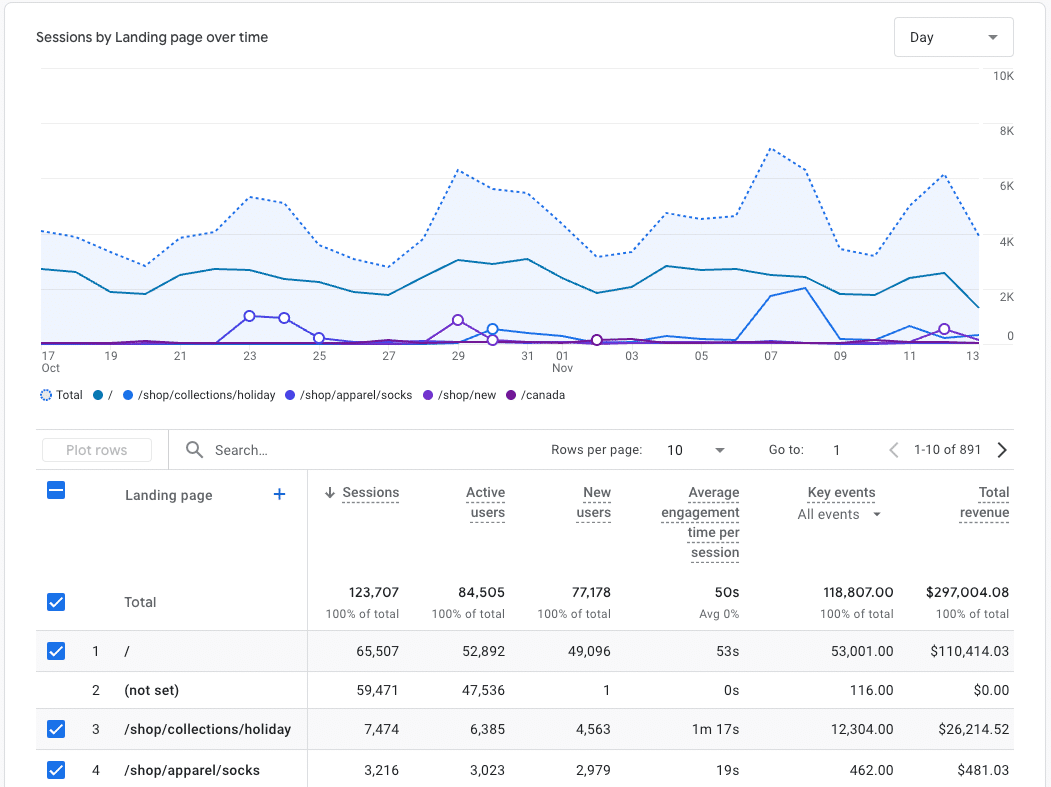
It connects natively with Google Ads, Google Search Console, and the broader Google ecosystem — making it the default choice for anyone running paid campaigns or monitoring organic search performance.
GA4 is free for standard use, with no cap on the number of sites, goals, or custom dimensions.
For WordPress site owners, MonsterInsights connects GA4 to WordPress through a guided setup wizard, surfaces your most important reports directly inside the WordPress admin, and activates advanced tracking — eCommerce, form conversions, scroll depth, affiliate clicks — without touching a line of code.
GA4’s interface is powerful, but it has a steep learning curve — particularly the Explore reports and custom funnel setup. That’s a real consideration for non-technical users, which is part of why Matomo’s more familiar layout appeals to people who found GA4’s redesign confusing.
What Is Matomo?
Matomo is an open-source web analytics platform that launched as Piwik in 2007 and rebranded in 2018.
Its founding principle — that your analytics data belongs to you, not a third party — has stayed consistent throughout. Today, Matomo is used by over 1.4 million websites across more than 190 countries.
Matomo offers the same core tracking capabilities as GA4 — visitor locations, devices, traffic sources, top pages, goal completions, and eCommerce data.
What makes it different is where that data lives. With Matomo On-Premise (the self-hosted version), your analytics data is stored on your own server. Google never sees it. No third party does.
Matomo comes in two versions: Matomo On-Premise (free, self-hosted) and Matomo Cloud (hosted by Matomo, paid). On-Premise is where the privacy advantage is strongest — but it requires server infrastructure and technical setup.
Matomo Cloud is more accessible but moves your data to Matomo’s servers, which reduces (though doesn’t eliminate) the privacy-from-Google argument.
Here’s how the two tools compare at a glance before we go section by section:
| Feature | Matomo | Google Analytics 4 (GA4) |
|---|---|---|
| Data ownership | You own it completely (self-hosted) | Google processes and stores your data |
| Cost | Free (self-hosted) / from ~$26/mo (Cloud) | Free (standard) / GA4 360 for enterprise |
| Privacy / GDPR | Can run without consent banner (self-hosted) | Requires consent management in EU |
| Data sampling | 100% unsampled data | Thresholds applied in some reports |
| Data retention | Unlimited (self-hosted) | 14 months by default |
| WordPress integration | Plugin available; basic | Deep integration via MonsterInsights |
| eCommerce tracking | Built-in (manual setup) | 1-click via MonsterInsights (Pro+) |
| Forms tracking | Built-in, automatic | Via MonsterInsights addon |
| AI assistant | None | Charlie Chat (MonsterInsights, all plans) |
| Cookieless tracking | Yes (built-in option) | Limited (consent mode only) |
Matomo vs. Google Analtics: A Complete Review
Privacy and Data Ownership
This is Matomo’s strongest argument — particularly for regulated industries and EU-based businesses with strict data residency requirements.
When you run Matomo On-Premise (the self-hosted version), your analytics data never leaves your server. Google never sees it. No third party does. For regulated industries — healthcare, finance, legal services — or for businesses operating under strict EU data residency requirements, this is a meaningful difference.
Matomo also offers cookieless tracking as a built-in option. In cookieless mode, Matomo doesn’t drop any tracking cookies at all — it uses anonymized, aggregated data instead. In some EU jurisdictions, this means you can operate without a consent banner, which removes real friction from the visitor experience.
The GDPR picture is nuanced. Matomo self-hosted, configured correctly with cookieless tracking and IP anonymization, can meet GDPR requirements without requiring user consent under some configurations — but verify this with your legal team for your specific country and use case. The EU regulatory landscape varies by member state, and “no consent banner needed” is not a universal rule.
GA4 processes data on Google’s US servers. For most WordPress businesses, this is fine — Google is a recognized data processor, and GA4 with proper consent management satisfies GDPR in most scenarios. But for regulated EU businesses dealing with sensitive data categories, the difference in data location is real and can create compliance complexity that Matomo self-hosted simply doesn’t have.
The MonsterInsights EU Compliance addon handles the GA4 side of this — IP anonymization, PII prevention, cookie consent integration — for most WordPress sites. It does not make GA4 data-residency equivalent to Matomo self-hosted. These are two different approaches to privacy: one processes data through a third-party infrastructure, the other keeps everything on your own server.
Who Owns Your Analytics Data?
Matomo wins for data sovereignty (keeping your visitor data on your own server, away from third parties): self-hosted means your data never leaves your server. For most WordPress sites with proper consent tooling, GA4 + the MonsterInsights EU Compliance addon covers GDPR compliance without the infrastructure overhead of running Matomo yourself.
Winner: Matomo — For regulated industries and EU businesses with strict data residency requirements, Matomo On-Premise keeps your visitor data entirely on your own server with no third-party access. For most WordPress sites, the MonsterInsights EU Compliance addon covers GDPR requirements without the server infrastructure overhead.
Installation and Setup
Getting GA4 onto a WordPress site the traditional way involves creating a GA4 property, copying a measurement ID or tracking snippet, and pasting it into your theme files or a header plugin. That’s manageable — but it’s also easy to get wrong, and a misconfigured setup means missing data you’ll never recover.
MonsterInsights handles the entire connection through a guided setup wizard. Connect your GA4 property, confirm tracking is live, and you’re done — usually in under five minutes, with no code or theme editing required.
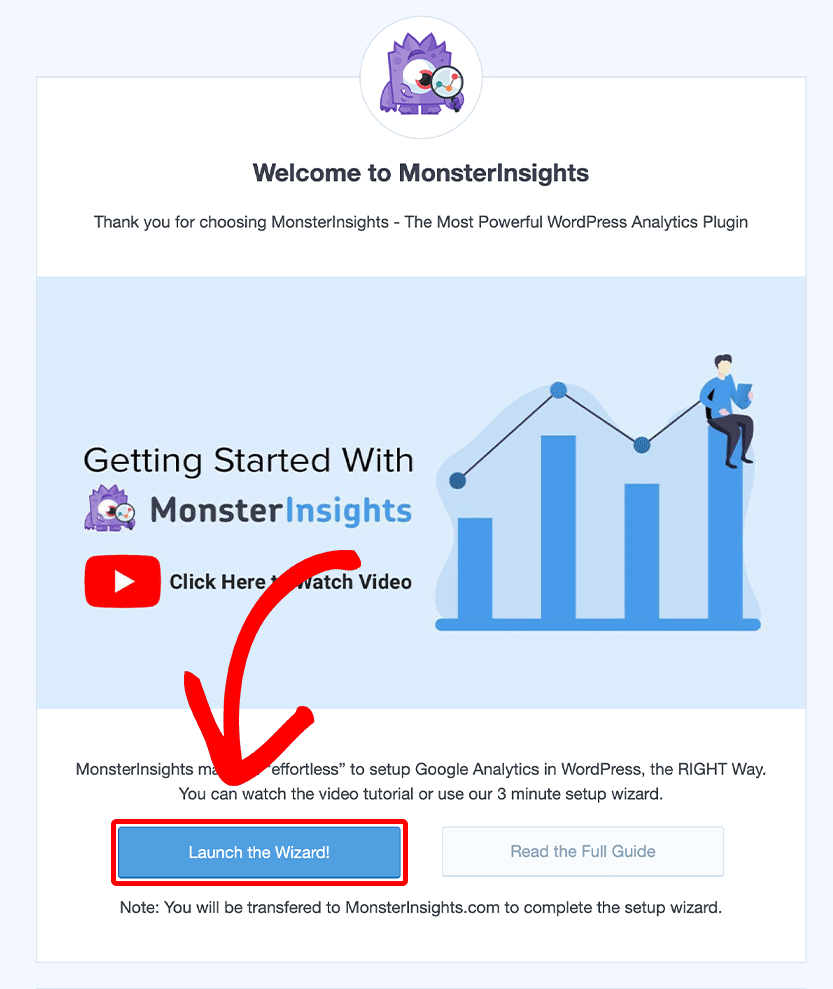
For a full walkthrough, see our guide on how to set up Google Analytics on WordPress from scratch.
Matomo offers two paths: Cloud-hosted and On-Premise (self-hosted).
Matomo Cloud works similarly to GA4 — sign up, get your tracking code, add it to your site. A WordPress plugin is available for this, though the setup experience isn’t as guided as the MonsterInsights wizard.
Matomo On-Premise requires access to a web server, a MySQL database, and comfort with server administration. If that’s not you, you’ll likely need a developer. This is the trade-off you make for full data ownership — it’s not a flaw in Matomo, it’s the nature of self-hosted software.
For most WordPress site owners who aren’t already running dedicated infrastructure, Matomo Cloud is the realistic option — and at that point, the data-residency advantage of self-hosting disappears.
Connect GA4 to WordPress Without Touching Code
MonsterInsights walks you through GA4 setup with a guided wizard — no code, no theme editing, no developer needed. Get accurate tracking live in minutes.
Get MonsterInsights FreeWinner: Google Analytics + MonsterInsights — The guided setup wizard gets WordPress sites tracking accurately in under five minutes with no code required. Matomo On-Premise requires server access and technical configuration; Matomo Cloud is simpler but loses the data-residency advantage.
Tracking Features
Both platforms cover the core tracking events you need: pageviews, sessions, traffic sources, bounce rates, and goal completions. The differences show up in how those tracking features are accessed, configured, and extended.
Matomo includes automatic form tracking as a built-in feature — no addon required. On paid Cloud plans, it also bundles heatmaps and session recordings. For sites where those features matter and the alternative is stitching together multiple plugins, Matomo’s bundled approach is genuinely appealing.
On Matomo Cloud’s entry-level plans, you’ll run into limits: 30 custom dimensions, 100 segments, and 150 goals. The Enterprise plan lifts those caps but at a custom-quoted price. Matomo On-Premise is fully unlimited.
GA4 has no hard limits on conversions, segments, or custom dimensions for standard free accounts.
Where GA4 would otherwise require manual event configuration or Google Tag Manager, MonsterInsights automatically handles the most common tracking needs for WordPress sites. Scroll depth, file downloads, outbound clicks, and affiliate link clicks are tracked the moment you install the plugin — no extra steps needed.
eCommerce tracking is where the gap is most visible. If you run a WooCommerce store, MonsterInsights connects your purchase data to GA4 with one click — no developer, no custom event setup. Revenue, conversion rate, average order value, and top products flow into GA4 automatically.
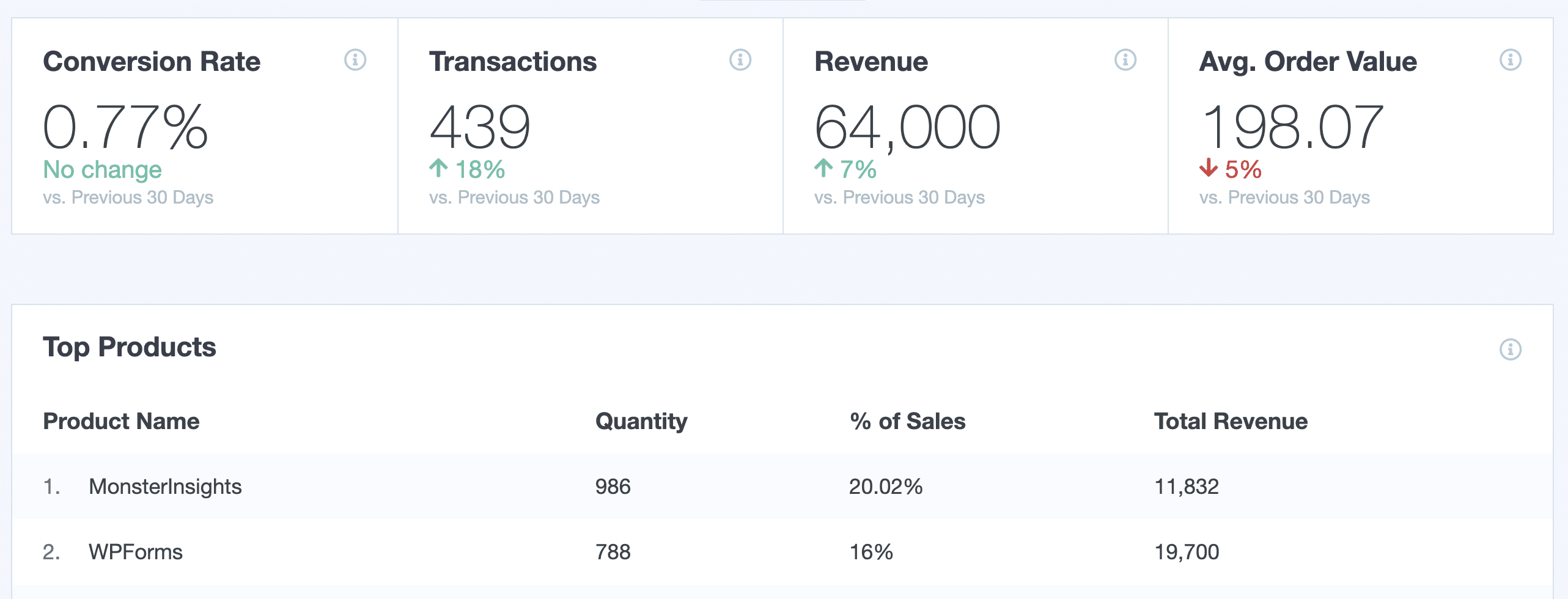
See our guide on how to set up WooCommerce Google Analytics tracking for the full step-by-step process.
For forms, the MonsterInsights Advanced Forms Report shows which forms are converting and which aren’t — directly inside WordPress, across WPForms, Gravity Forms, and more.
For Google Ads, GA4’s native integration provides direct attribution without manual UTM setup.
Matomo requires adding UTM parameters to every ad URL manually — there’s no native Google Ads connection.
Winner: Google Analytics + MonsterInsights — GA4 has no limits on conversions, segments, or custom dimensions at the free tier, and MonsterInsights activates eCommerce, form, scroll, and affiliate tracking automatically. Matomo’s bundled heatmaps and automatic form tracking are useful, but GA4’s ecosystem depth and native Google Ads integration give it the edge for most WordPress sites.
Reporting and Dashboards
GA4’s reporting interface is powerful — and famously difficult. The navigation has been redesigned multiple times since launch, and Explore reports require building custom queries that most non-technical users won’t touch. The data is there; finding it is the challenge.
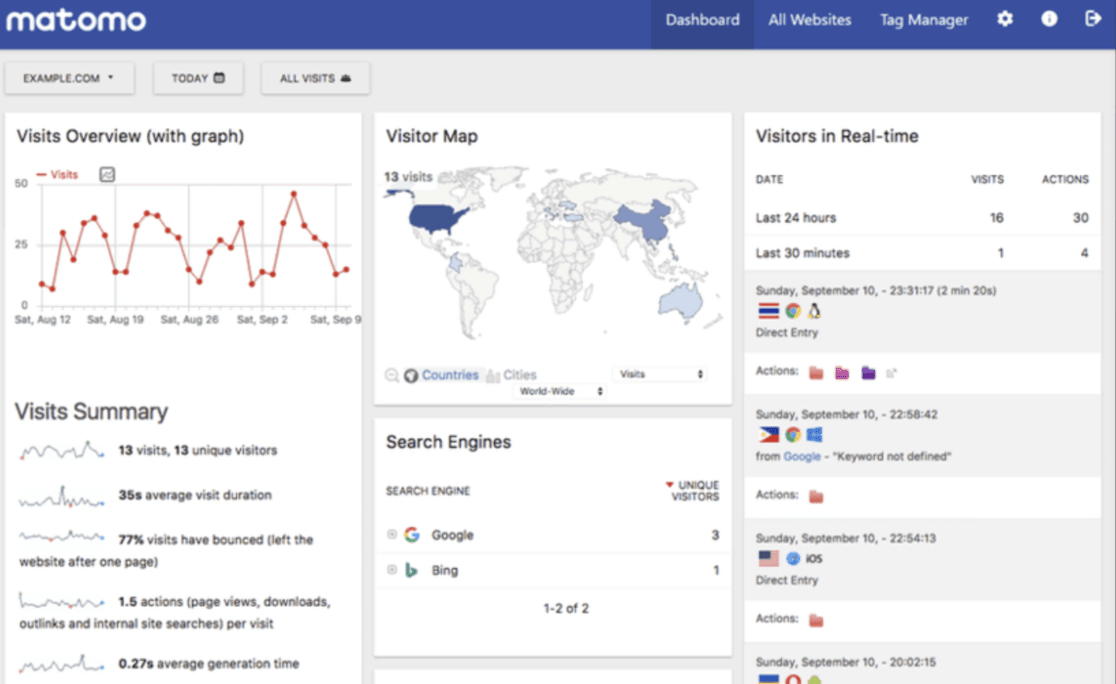
Matomo’s dashboard is organized more like the old Universal Analytics — a sidebar with familiar report categories, less reliance on custom explorations. If you found GA4’s interface confusing, Matomo’s layout will feel more intuitive.
For WordPress sites running MonsterInsights, the reporting experience is different from both.
Your most important GA4 metrics — sessions, pageviews, traffic sources, top pages, real-time visitors — appear directly inside your WordPress admin dashboard.
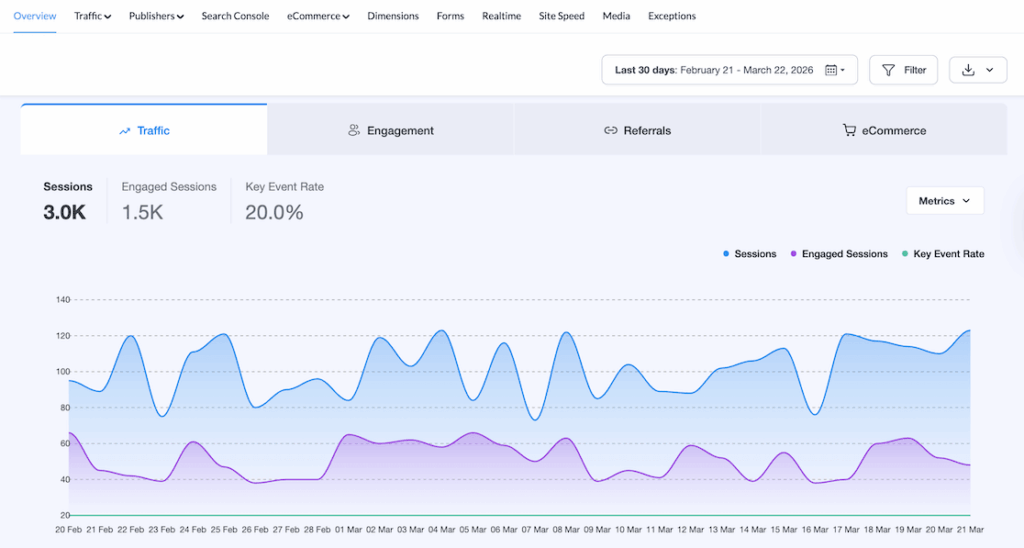
You don’t need to log into GA4 at all for routine checks.
For a full look at what’s available, see our Google Analytics reports guide — it covers the specific reports MonsterInsights surfaces inside WordPress and what decisions each one supports.
Winner: Tie — Matomo’s sidebar-based layout will feel more familiar if GA4’s redesigned interface has frustrated you. MonsterInsights puts your GA4 data inside WordPress where you already work, removing the need to log into GA4 for routine checks. Which reporting experience works better depends on your workflow.
AI-Powered Data Analytics
Analytics data is only useful if you understand what it means and what to do about it. Good AI data analytics tools can help surface that meaning automatically. AI-powered data can help even the most novice users make sense of large data sets.
MonsterInsights has the clear edge in this department. Its Charlie Chat tool lives inside your MonsterInsights dashboard and lets you ask plain-English questions about your GA4 data.
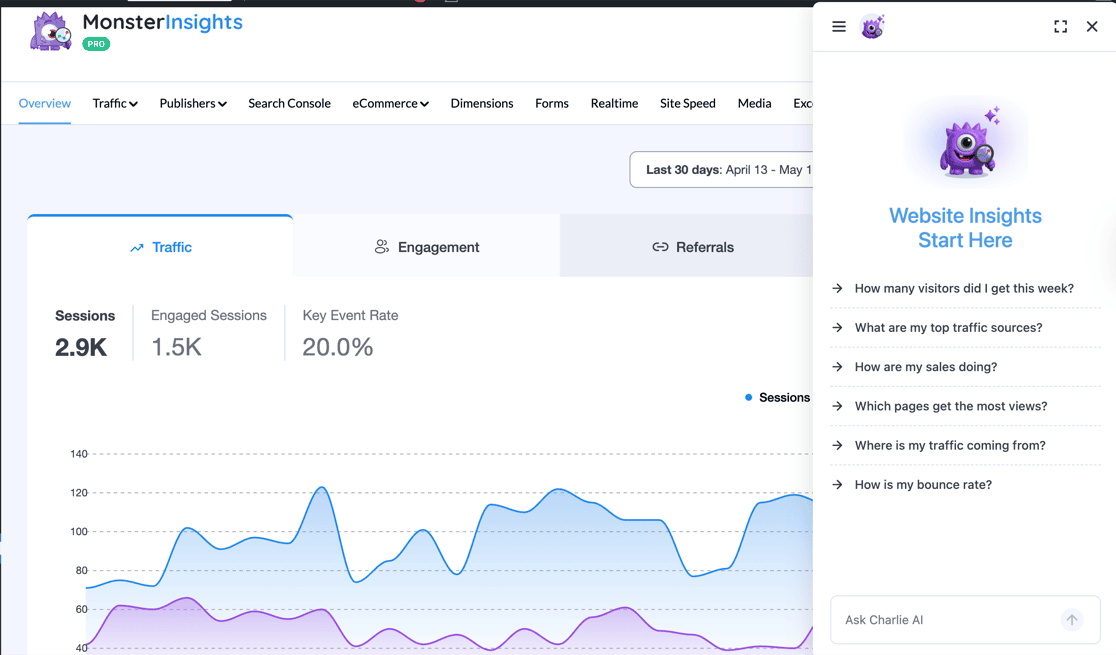
You can ask questions like “which pages drove the most revenue last month?” or “where am I losing visitors in the checkout flow?” and get a data-backed answer, not just a link to a report.
Each response includes:
- Recommended Actions — specific next steps based on what your data shows
- Quick Key Insights — shortcuts that surface the most important takeaways without requiring you to interpret raw numbers
Chat history is saved and pinnable, so you can return to useful queries without starting over. Charlie Chat is available on all MonsterInsights plans — including the free Lite version — at no extra cost.
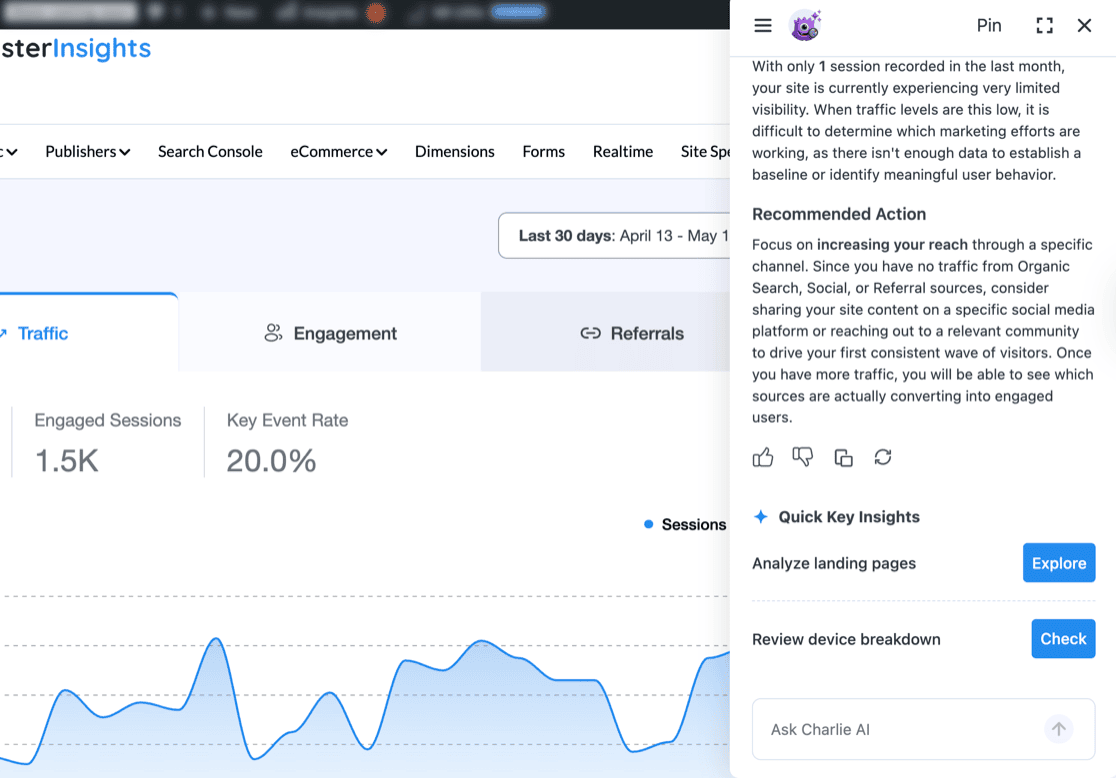
Matomo has no equivalent feature. Their interface gives you the data; interpreting it and deciding what to do next is left entirely to you.
Winner: Google Analytics + MonsterInsights — Charlie Chat adds a conversational AI layer that helps you act on your data, not just read it. Matomo has no comparable feature at any plan level.
Data Accuracy and Retention
For many businesses, data completeness matters more than interface design. This is another area where Matomo has a real argument.
Matomo gives you 100% unsampled data. Every visit, every event, every conversion is captured and reported exactly as it happened. GA4 applies data thresholds in some reports — particularly in Explore reports and Audience Insights — which can obscure results on smaller traffic volumes or very narrow segments.
Data retention is the other meaningful difference. GA4 defaults to 14 months of event data retention. Matomo self-hosted has no data retention limits by default — your historical data stays as long as your server keeps it.
For eCommerce stores doing year-over-year comparisons, or businesses that need to audit historical traffic patterns, this matters. Running out of GA4 data range mid-analysis is a genuinely frustrating experience.
The practical counterpoint: Matomo’s unsampled data advantage is most valuable when you actually access and act on it regularly. GA4 connected to MonsterInsights puts your key traffic and revenue metrics front-and-center inside WordPress — the dashboard most site owners check every day. Complete data you don’t regularly see has limited real-world value.
On Data Completeness
Matomo wins for data completeness: 100% unsampled data and unlimited retention on self-hosted plans. GA4 + MonsterInsights wins for accessibility — having that data inside WordPress where you already work makes it far more likely you’ll actually use it.
Winner: Matomo — 100% unsampled data and unlimited retention on self-hosted plans are genuine advantages for businesses that rely on long-term historical analysis or precise segment-level reporting. GA4’s 14-month default retention and sampling thresholds are real limitations for those use cases.
Pricing
The pricing comparison here is less straightforward than it looks.
Matomo On-Premise is free to download. Running it yourself means paying for server infrastructure, ongoing maintenance, and potentially developer time when configuration is needed. For non-technical site owners, the “free” label can be misleading.
Matomo Cloud starts at approximately $26/month for up to 30 websites (pricing varies by traffic volume and is billed annually). Enterprise plans with custom pricing are available for larger organizations needing higher data volumes or bundled features like heatmaps and session recordings.
GA4 is free at the standard level. If you run a WordPress site and want proper eCommerce tracking, in-dashboard reporting, and advanced features, MonsterInsights adds a paid layer on top. Here’s how the plans break down:
- Plus — $99.50/year (1 site): Overview reports, Publishers report, search keywords, scroll tracking, EU Compliance addon
- Pro — $199.50/year (5 sites): Everything in Plus + WooCommerce eCommerce tracking, form conversion tracking, User Journeys, all advanced integrations
- Elite — $299.50/year (5 sites): Everything in Pro + multisite support, advanced access control, client license management, UserFeedback Elite
- Agency: 25-site license, designed for agencies managing multiple client sites
For a single WordPress site running WooCommerce, MonsterInsights Pro at $199.50/year delivers GA4’s free data layer plus purpose-built eCommerce reporting — often at a lower annual cost than Matomo Cloud’s ongoing monthly subscription.
Winner: Tie — GA4 is free, and so is Matomo On-Premise (though self-hosting has real infrastructure costs). Both tools have paid tiers that serve different needs. The right choice depends on whether you need self-hosted data control or WordPress-specific reporting features.
Support
GA4 has the ecosystem advantage by a wide margin. There’s over a decade of documentation, YouTube tutorials, community forums, and third-party training materials. When you hit a problem, someone has usually already solved it and written about it.
Matomo’s support resources are more limited — primarily their own documentation and community forum. Third-party guides exist but are far less common than GA4 resources. For non-technical users who rely on tutorials and community knowledge to troubleshoot, this is a real friction point.
MonsterInsights customers on paid plans get email support from a dedicated team, plus access to a full documentation library at monsterinsights.com/docs. Priority support is available on Pro plans and above.
Winner: Google Analytics + MonsterInsights — GA4 has a far deeper support ecosystem built over more than a decade, and MonsterInsights adds dedicated email support and a documentation library on top. Matomo’s support resources, while solid, are narrower and primarily self-serve.
Matomo or Google Analytics: Which One Should You Choose?
The honest answer depends on why you were considering Matomo in the first place.
For the majority of WordPress site owners — those running content sites, WooCommerce stores, or lead generation businesses — GA4 connected through MonsterInsights is the right call. The ecosystem, the integrations, the in-dashboard reporting, and Charlie Chat’s conversational AI give you more usable insight for less effort.
But if your primary concern is keeping visitor data off third-party servers, Matomo On-Premise is a serious tool with genuine advantages.
FAQs About Matomo vs. Google Analytics
Is Matomo really free?
Matomo On-Premise is free to download and use. However, running it yourself means paying for web hosting, a database, and potentially developer time to set it up and maintain it. Matomo Cloud (the hosted version) starts at around $26/month. So “free” applies to the self-hosted version only — and that version comes with real infrastructure costs.
Is Matomo better than Google Analytics for privacy?
Yes, if you run Matomo On-Premise and configure it with IP anonymization and cookieless tracking. Your data never leaves your server, Google never sees it, and in some EU configurations you can operate without a consent banner. GA4 processes data on Google’s US servers, which requires consent management to satisfy GDPR. For most WordPress sites, GA4 with proper consent tooling is compliant — but for regulated EU industries, Matomo self-hosted offers a fundamentally different level of data control.
Does Matomo work with WordPress?
Yes — Matomo offers a WordPress plugin for both its Cloud and On-Premise versions. The plugin adds the tracking code to your site without manual theme edits. However, the setup experience is less guided than MonsterInsights, and Matomo’s plugin doesn’t surface analytics data inside your WordPress dashboard the way MonsterInsights does with GA4.
Is Matomo GDPR compliant?
Matomo can be configured to be GDPR compliant — particularly when self-hosted with IP anonymization enabled and cookieless tracking turned on. In those configurations, Matomo can operate without requiring visitor consent in some EU scenarios, because no personal data is collected. Always verify your specific configuration with a legal professional, as GDPR requirements vary by EU member state and data category.
What are the main differences between Matomo and GA4?
The biggest differences are data ownership, privacy defaults, and ecosystem depth. Matomo self-hosted keeps all data on your server with no third-party access; GA4 processes data on Google’s servers. Matomo provides 100% unsampled data and unlimited retention on self-hosted plans; GA4 has 14-month default retention and applies thresholds in some reports. GA4 has a far larger support ecosystem, deeper WordPress integration via MonsterInsights, and native Google Ads integration. Matomo is the better choice for data sovereignty (keeping your visitor data on your own server, away from third parties); GA4 is the better choice for ecosystem, tooling, and ease of use on WordPress.
Can I use both Matomo and Google Analytics at the same time?
Yes. Running both simultaneously is a legitimate approach — GA4’s ecosystem advantages alongside Matomo’s unsampled, fully-owned data as a verification layer. Some businesses use Matomo as a compliance-friendly audit trail while using GA4 + MonsterInsights for day-to-day decision-making. The trade-off is added complexity and two separate systems to maintain.
That covers everything you need to make a confident call between Matomo and Google Analytics. If you’re leaning toward GA4 on WordPress, these guides will help you get the most out of your setup:
- How to Set Up Google Analytics: Step-by-Step
- How to Set Up WooCommerce Google Analytics Tracking
- Google Analytics Reports: The Ultimate Guide (GA4)
- MonsterInsights vs. Google Site Kit: A Detailed Comparison
- How to Easily Keep PII Out of Google Analytics
- eCommerce Conversion Funnel: Beginner’s Guide
Follow us on Twitter, Facebook, and YouTube for more Google Analytics tips.