


Most marketing teams have more data than they can act on. The bottleneck isn’t the reports — it’s getting from the numbers to a clear decision about where to focus.
In this comprehensive guide, I’ll share how artificial intelligence is reshaping marketing analytics and how you can take advantage of it.
I’ll also cover practical applications, essential features to look for, and how to implement AI-powered solutions that deliver measurable results.
Let’s jump right in!
In This Article:
What Is AI in Marketing Analytics?
AI in marketing analytics uses smart technology to analyze your marketing data and find useful insights. Unlike traditional analytics that require extensive manual work, AI quickly processes huge amounts of information, spots patterns, and predicts trends.
Think of AI as your personal data interpreter – like having a brilliant analyst on your team who can instantly identify patterns in your business data and explain them in plain English.
According to recent studies, 71% of customers expect personalized interactions from brands. This represents enormous work that isn’t always sustainable manually, but AI makes this personalization possible at scale.
With AI in marketing analytics, you can:
- Track customer behavior in real-time
- Create detailed audience segments based on multiple factors
- Predict campaign performance before launch
- Optimize marketing budget allocation
- Personalize content for different audiences
- Get insights in plain language without technical expertise
Must-Have Features in AI Marketing Tools

When choosing AI marketing tools, look for these key features:
1. Real-Time Analysis
Traditional tools often show outdated information. Modern AI platforms bring all your marketing data into one dashboard, giving you instant insights into what matters.
This lets you:
- Watch campaign performance as it happens
- Notice trends right away
- Make quick improvements
- Test and optimize on the fly
Real-time access means you’re reacting to what’s actually happening — not to data that’s already a week old.
2. Easy Data Exploration
Good AI tools make complex data easier to understand through simple visuals. You can:
- Filter data instantly
- Look deeper into specific segments
- Create custom visuals
- Compare different campaigns and time periods
This helps you quickly see which strategies drive sales, find weak spots, and create better messages for your audiences.
3. Smart Insights
AI and machine learning enhance data analysis by finding insights automatically. This helps you:
- Get insights generated from your data
- Find patterns that show customer loyalty or unhappiness
- Spot unusual activities and understand why they happened
- Discover things you didn’t think to look for
These aren’t insights you had to go looking for — AI surfaces them as you work, so nothing important slips past you.
4. Plain Language Queries
With natural language processing, you can talk to your data using everyday language. Instead of complex queries, simply ask:
- “What was our best campaign last month?”
- “Which customers have the highest lifetime value?”
- “How did our social media traffic compare to search traffic?”
This makes data accessible to everyone on your team, not just technical experts.
How AI Makes Marketing Analytics Better

AI turns marketing analytics from slow guesswork into a powerful advantage:
Faster Insights & Reduced Stress
Get useful data in seconds instead of days, so you can:
- Respond to market changes right away
- Adjust campaigns based on real-time performance
- Spot trends before competitors
- Save hours of report creation time
Remember those Monday mornings spent creating reports only to struggle with interpretation? AI transforms this experience.
Instead of drowning in spreadsheets, you can simply ask your AI analytics tool for key metrics while enjoying your coffee.
Better Budget Decisions
Make smarter choices about your marketing spending by:
- Putting money into channels that actually work
- Stopping poor campaigns before they waste your budget
- Reducing wasted ad spend through better targeting
- Testing new approaches efficiently
Growth Without Headaches
Handle increasing complexity as your business grows:
- Process millions of data points at once
- Find specific insights in massive datasets
- Manage multiple marketing channels from one dashboard
- Combine different types of data for complete analysis
Predict What’s Coming
Use past results to shape future success:
- Anticipate customer needs before they tell you
- Prepare for upcoming market changes
- Allocate resources proactively
- Stay ahead of competitors with data-backed forecasts
Pro Tip: Start by applying AI analytics to one area where you need the most improvement. Use those quick wins to build momentum for wider adoption.
Charlie Chat: Get Answers from Your Marketing Data
Your marketing data already has the answers to the questions you ask every week. The problem has never been the data — it’s the time it takes to dig for it. Charlie Chat is how you surface those answers without opening a single report.
It’s built directly into MonsterInsights, connects to your live GA4 data, and responds with specific numbers, period comparisons, and a recommended next step — all from a single question.
How It Works
Instead of opening different reports to find specific stats, you can ask Charlie Chat questions like:
- “Which of my blog posts got the most traffic last month?”
- “What’s my best-performing product?”
- “How is my website performing compared to last month?”
Charlie Chat pulls the answer straight from your Google Analytics data — the specific stat you need, right now, with context about what changed and why it matters.
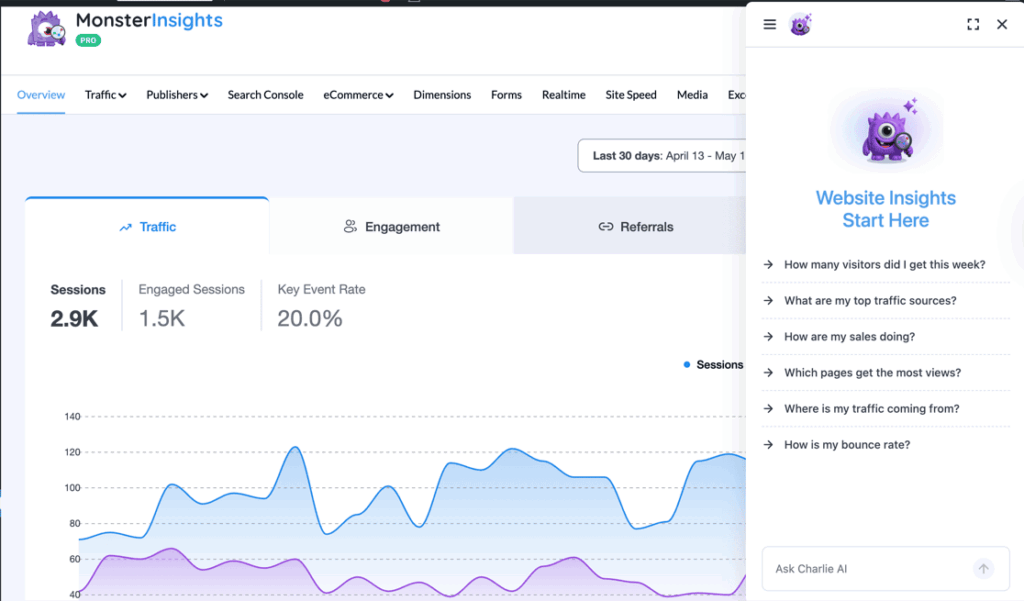
For example, if you need to know the conversion rate for a specific landing page, just ask.
Or if you run an online store and need to know revenue for a specific product in a specific time frame — no report adjustments needed. Just ask.
Answers can come back as numbers, summaries, or visual graphs — whatever makes the data easiest to act on.
Getting Started with Charlie Chat
Charlie Chat is available on every MonsterInsights plan — including the free version. The data it can access scales with your plan: traffic and content insights work on all plans, while eCommerce data like revenue and conversions requires Pro or above.
If you’re already using MonsterInsights, Charlie Chat is ready right now. Head to Insights » Reports and look for the Charlie Chat icon in the bottom-right corner of the screen. Click it to open the chat panel and start asking questions about your marketing data.
If you’re not using MonsterInsights yet, install it from the MonsterInsights site and connect it with your Google Analytics account. Our full guide on how to add Google Analytics to WordPress walks through every step.
Get AI Marketing Analytics for Your WordPress Site
MonsterInsights connects your WordPress site to Google Analytics and gives you Charlie Chat — ask questions about your marketing data and get specific answers immediately. Available on every plan, including free.
See MonsterInsights PlansReal-World Uses of AI in Marketing Analytics
Here’s how AI is turning marketing analytics into practical, results-driven strategies:
Better Customer Segmentation
Traditional customer segmentation often uses basic categories like age or location. AI finds sophisticated patterns across millions of data points that humans would miss.
AI segmentation identifies customers based on likely future behaviors, not just past actions. This means you can:
- Spot customers about to leave before they go
- Find prospects likely to buy
- Create micro-segments for truly personalized marketing
Content Optimization Across Channels
Today’s customer journey isn’t a straight line—it’s a complex web across multiple devices and platforms. AI helps by monitoring interactions throughout the entire journey and optimizing content for each touchpoint.
AI analyzes:
- Content engagement by channel
- Click patterns on different ads
- Best times for delivery based on user behavior
This shows when customers are most receptive to specific offers and which approaches work best with different segments.
For example, AI might reveal that email subscribers who first found you through Instagram are 40% more likely to convert when they receive personalized product recommendations.
Understanding Customer Sentiment
Understanding how customers truly feel about your brand takes more than counting stars in reviews.
AI-powered sentiment analysis reads the emotional context behind customer feedback across social media, reviews, support chats, and surveys.
This technology understands nuance and context. It can:
- Detect emerging issues before they become big problems
- Identify your biggest brand advocates
- Uncover specific product features that drive emotional responses
In my experience, sentiment data is most useful when it surfaces an issue early — before it shows up in your churn numbers.
Improving Conversion Rates
The path from interest to purchase often has hidden obstacles. AI excels at analyzing detailed user behavior on your website to find precise improvement opportunities.
By tracking mouse movements, scrolling patterns, time spent on elements, and many other small interactions, AI can identify exactly where potential customers hesitate or leave.
Northmill Bank is a great example. Using AI-powered analytics, they identified a specific segment of customers who always abandoned their sign-up process at the same point.
After redesigning their onboarding based on these insights, they achieved a 30% boost in conversion rates.
Better Marketing Attribution
Understanding which touchpoints truly drive conversions is increasingly difficult.
A customer might find you through social media, research on your blog, leave, return through a search ad, and finally convert after receiving an email.
AI marketing analytics creates sophisticated models that track the entire customer journey across devices and channels.
Unlike traditional last-click attribution, AI can assign proper credit to each touchpoint based on its actual influence on the final conversion.
Top Benefits of Using AI Analytics
Save Time and Reduce Stress
The most immediate benefit is the gift of time. Instead of spending hours creating reports, you can get instant answers to your marketing questions.
Pro Tip: In my experience, the time you free up from report-building is best spent acting on what you find. Insights that don’t become decisions don’t move the needle.
Make Data-Driven Decisions
With AI analytics, your marketing decisions become rooted in concrete data rather than hunches. Having clear answers removes much of the guesswork from your strategy.
Spot Opportunities Faster
AI helps you identify opportunities you might have missed. For instance, AI might reveal that customers who buy product A are very likely to buy product B within 30 days, leading to profitable product bundles or targeted follow-up campaigns.
AI can also identify emerging trends before they become obvious, allowing you to capitalize on these trends before your competitors.
Worth Knowing
The biggest shift AI brings to marketing analytics isn’t just speed — it’s getting to the decision faster without needing to be a data expert. Most of the value comes from asking better questions, not building better dashboards.
FAQs About AI in Marketing Analytics
How is AI used in marketing analytics?
AI transforms marketing analytics by automating data processing and uncovering hidden patterns. It segments customers based on behavior predictions, personalizes content at scale, and provides real-time campaign optimization. The technology also enables natural language queries, making analytics accessible to non-technical team members while delivering deeper customer journey insights than traditional methods.
Is there an AI for market analysis?
Absolutely. Tools like MonsterInsights, IBM Watson Analytics, and ThoughtSpot use AI for market analysis. These platforms analyze consumer behavior, predict market trends, and identify emerging opportunities. AI market analysis tools can process vast amounts of data from social media, reviews, and industry reports to reveal competitive insights that would take humans weeks to uncover.
How to use AI in business analytics?
Start by defining clear business objectives for your AI implementation. Choose tools that integrate with your existing data sources, then begin with a focused use case like customer segmentation or sales forecasting. Train your team on the new tools, establish baseline metrics for comparison, and gradually expand your AI applications as you demonstrate ROI.
How is AI used in predictive analytics?
AI powers predictive analytics by using historical data to forecast future outcomes. Machine learning algorithms identify patterns in customer behavior, sales trends, and market conditions to predict future purchasing decisions, inventory needs, and campaign performance. These models continuously improve over time as they process more data, helping businesses shift from reactive to proactive decision-making.
And that’s it! I hope this guide gave you a clearer picture of how AI can sharpen your marketing analytics workflow. Here are some related articles to keep the momentum going:
- How to Use Google Analytics and AI to Grow Faster
- Best Ways to Use ChatGPT with Google Analytics [GA4]
- Best AI Tools for Digital Marketing: Your Complete Guide
- How to Create a Data-Driven Marketing Strategy in 2026
- Best ChatGPT WordPress Plugins
Not using MonsterInsights yet? Get started today!
Follow us on Twitter, Facebook, and YouTube for more Google Analytics tips.