


Most WordPress site owners install GA4, log in once, get lost in the interface, and never go back. Sound familiar? GA4 is built for enterprise data teams, not for people who just want to know what’s working on their site.
The right Google Analytics plugin for WordPress breaks that pattern. You get the numbers that actually matter inside your dashboard, without ever leaving WordPress. GA4 recently made several improvements to its reporting interface, but getting that data into WordPress still requires a dedicated plugin to be genuinely useful.
I’ve tested all the major options. Here are the 6 best Google Analytics WordPress plugins — and the one I recommend for most sites.
In This Article:
- Why Use Google Analytics on a WordPress Site?
- Why Use a Google Analytics WordPress Plugin?
- Quick Comparison: Best Google Analytics WordPress Plugins
- The Best Google Analytics WordPress Plugins
- Free vs. Paid Google Analytics Plugins: How to Choose
- What's the Best Google Analytics Plugin for WordPress?
- Video Tutorial: Best Google Analytics Plugins for WordPress
- FAQs About Google Analytics WordPress Plugins
Why Use Google Analytics on a WordPress Site?
Google Analytics gives you the data you need to stop guessing and start making smarter decisions about your site.
Without it, you’re flying blind — you might think a blog post is performing well because it got some comments, only to discover it has a sky-high bounce rate. Or you might be pouring energy into a page that you assume is underperforming, when it’s actually your biggest source of leads.
Here’s what you can actually learn from Google Analytics:
- How many people visit your site and how long they stay
- Demographics and interests of your visitors
- Your highest-traffic landing pages and best-performing content
- Top traffic sources — organic, social, referral, direct
- Which links people click and how they navigate your site
- Which products your visitors buy and how much revenue you’re generating
Once you have this data, you can build strategies around what’s actually working — not what you hope is working.
Why Use a Google Analytics WordPress Plugin?
You can technically add Google Analytics to WordPress by editing your theme files — but I’d strongly recommend against it. A dedicated plugin is safer, faster, and gives you far more useful data:
- Easier setup: Most plugins connect GA4 in a few clicks instead of copying code into theme files.
- No code required: No touching PHP or HTML files, which means less risk of breaking your site.
- Advanced tracking out of the box: Downloads, outbound links, form submissions, and eCommerce events are automatically tracked — no complex manual setup.
- Dashboard reports: The best plugins bring your most important data right into WordPress, so you never have to log into GA4 just to check a metric.
- Automatic updates: When Google changes its tracking code or releases new features, your plugin handles the update.
- User role exclusions: Easily filter out your own admin visits so your data stays clean.
Here are 6 options worth considering — with the one I’d use on any new WordPress site at the top.
Quick Comparison: Best Google Analytics WordPress Plugins
| PLUGIN | BEST FOR | STARTING PRICE |
|---|---|---|
| MonsterInsights | WordPress site owners who need full GA4 analytics — reports, eCommerce tracking, form tracking, and AI — without leaving their dashboard | Free (Lite); from $99.50/year |
| ExactMetrics | Agencies and teams managing multiple WordPress sites who need full GA4 analytics and dashboard reporting | Free (Lite); from $99.50/year |
| Google Site Kit | WordPress owners already using multiple Google tools who want one plugin to connect GA4, Search Console, AdSense, and PageSpeed | Free |
| Analytify | Small sites needing simple GA4 dashboard reporting without advanced tracking features | Free; from $59/year |
| Conversios | WooCommerce stores running Google Ads campaigns that need reliable conversion and product data in GA4 | Free; from $179/year |
| GA Google Analytics | Sites that just need lightweight GA4 tracking code added to WordPress with no extra features | Free; Pro $15/year |
The Best Google Analytics WordPress Plugins
1. MonsterInsights

BEST FOR: WordPress site owners who want their GA4 data inside the dashboard — no switching to Google Analytics
KEY FEATURES: Dashboard reports, Charlie Chat AI assistant, automatic event tracking, eCommerce reporting, form conversion tracking, User Journeys, Search Console keywords
PRICING: Free (Lite); from $99.50/year (Plus)
FREE PLAN / TRIAL: Yes — free Lite version available on WordPress.org
MonsterInsights is the best Google Analytics plugin for WordPress. It connects your site to GA4 and surfaces the data that actually matters — right inside your WordPress dashboard. That way, you don’t have to hunt through GA4 menus, copy tracking codes, or hire a developer to help you set it up.
The tabbed Overview Report gives you sessions, pageviews, users, bounce rate, engagement rate, and eCommerce metrics at a glance. Switch between tabs to drill into the numbers you need without leaving WordPress.
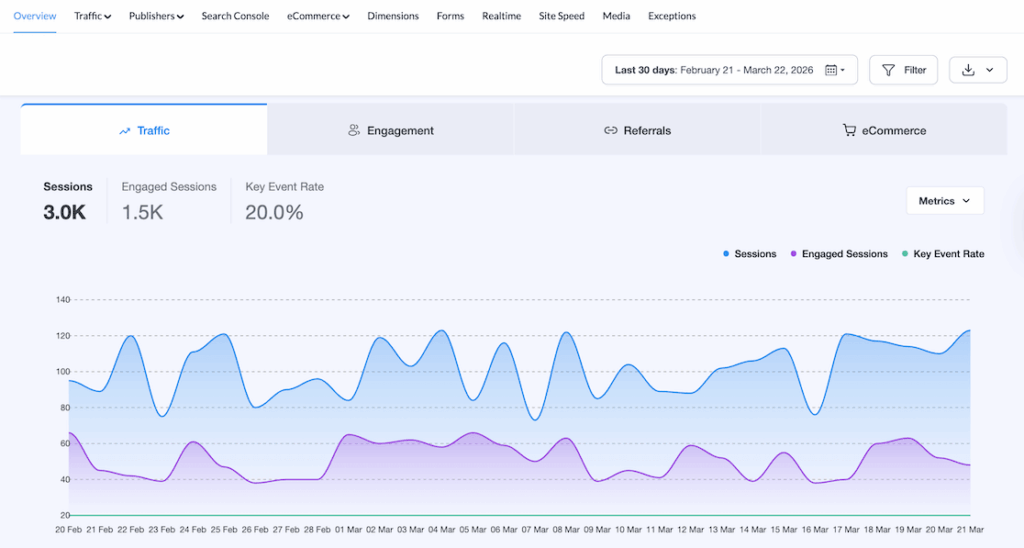
For WooCommerce store owners, the eCommerce Report shows total revenue, conversion rate, average order value, top products, and best traffic sources for sales — all in one place. Setup is one click.
You also get automatic tracking for file downloads, affiliate link clicks, outbound link clicks, and telephone link clicks. The Forms addon tracks conversions on WPForms, Gravity Forms, Formidable Forms, and others.
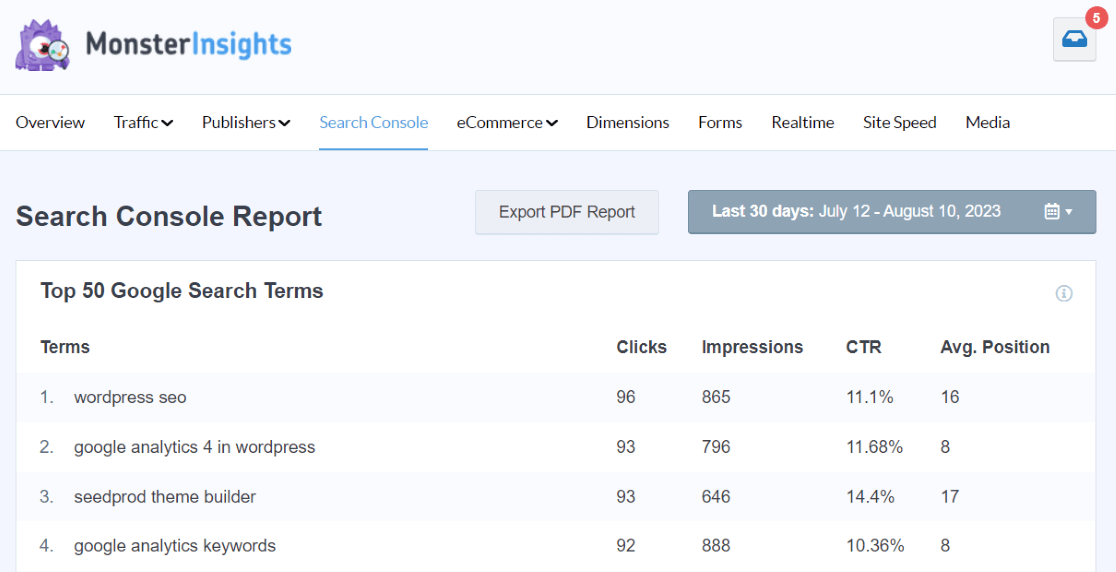
The Search Console report shows your top 50 search terms, click counts, and average positions — right inside WordPress, no switching tabs.
MonsterInsights also works out of the box with WooCommerce, MemberPress, Easy Digital Downloads, GiveWP, and more. Privacy compliance for GDPR, CCPA, and PIPEDA is handled automatically through the EU Compliance addon and Privacy Guard.
Plus, Charlie Chat is built into the bottom-right corner of the MonsterInsights Reports screen.
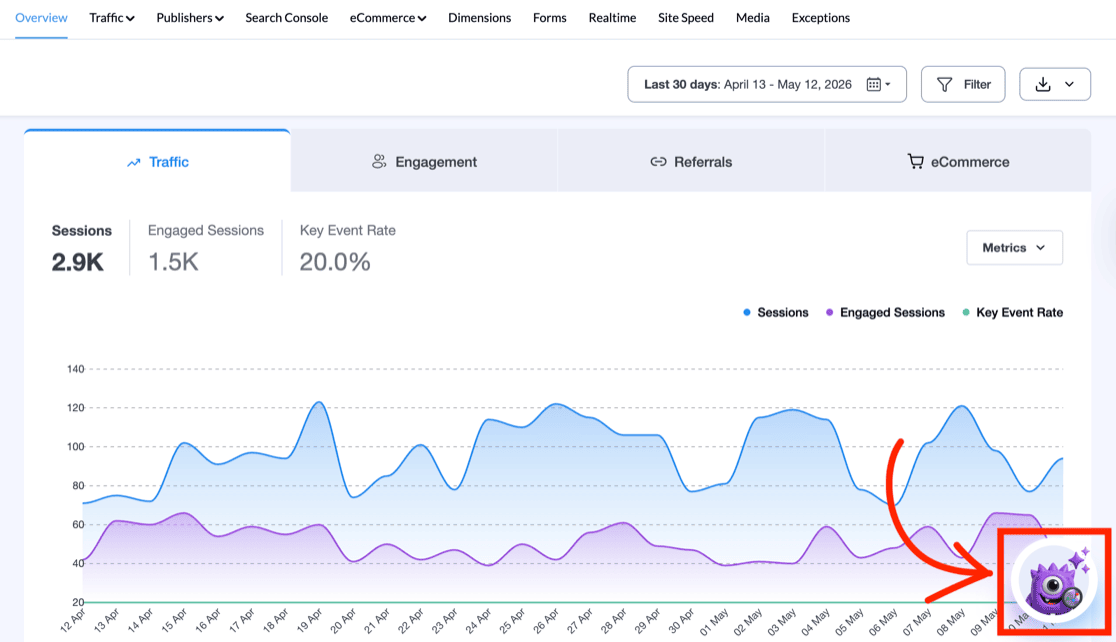
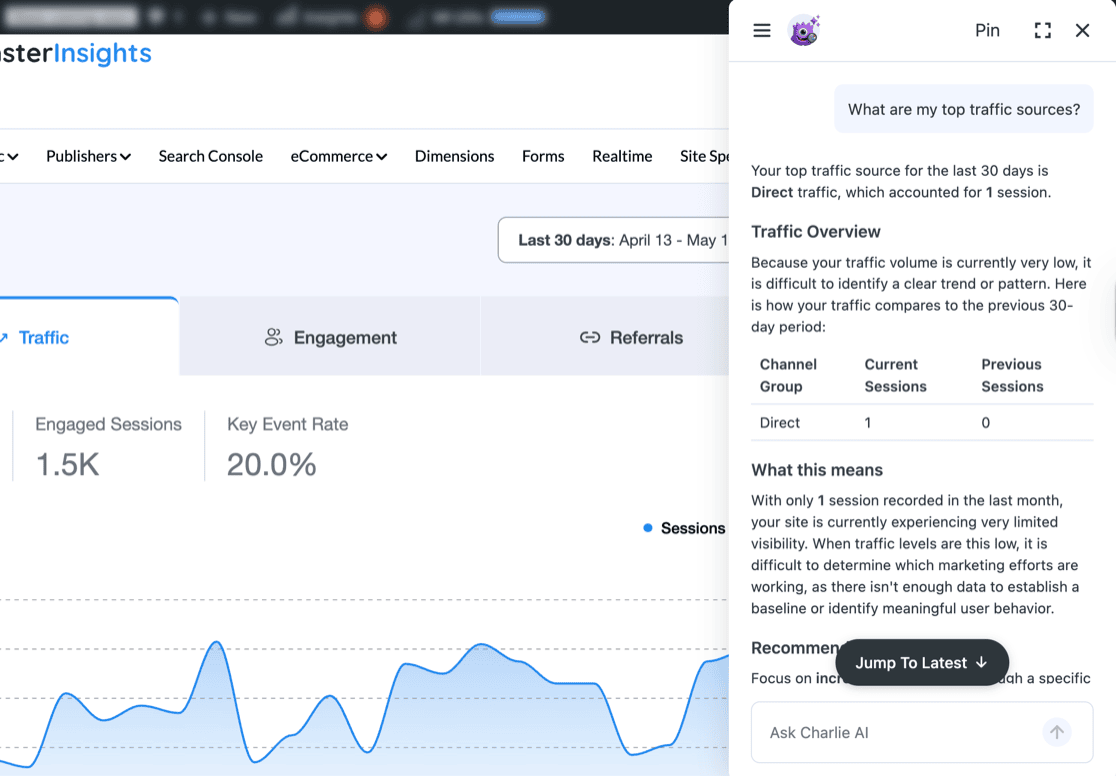
You can ask it what your top traffic sources were last month, why your bounce rate spiked, or how your WooCommerce revenue is trending, and the answer comes back right there, with a recommended next step and a direct link to the relevant report.
It’s free for every MonsterInsights user, including the Lite version. Click the icon and a response panel opens — here’s what an answer looks like:
Scroll depth, affiliate link clicks, file downloads, and outbound clicks all fire automatically the moment MonsterInsights is connected. The form conversion tracking works the same way for WPForms, Gravity Forms, Formidable Forms, and Contact Form 7.
The User Journey report shows every page a customer visited before completing a WooCommerce purchase, so you can see the actual path that leads to a sale.
Weekly email summaries keep your key metrics in your inbox without requiring a dashboard login. And custom dimensions let you track performance by author, category, and tag — useful for any content-driven site.
MY TAKE
MonsterInsights is the best Google Analytics plugin for WordPress. It covers everything from basic GA4 setup to advanced eCommerce reporting, it doesn’t require touching code, and Charlie Chat means you can get an answer to almost any analytics question without navigating GA4 at all. If you’re serious about understanding your site, this is where to start.
PROS
- No coding required — easy setup for any WordPress skill level
- All key GA4 data visible inside your WordPress dashboard
- Automatic event tracking with no configuration needed
- Deep WooCommerce integration including User Journeys
- Search Console data inside WordPress
- Privacy compliance (GDPR, CCPA, PIPEDA) handled automatically
- Charlie Chat AI assistant free for all users including Lite
- Free version available with core features
CONS
- Advanced reports (eCommerce, Forms, User Journeys) require a paid plan
- Could be more than needed for sites with minimal tracking requirements
Get started with MonsterInsights today!
2. ExactMetrics
BEST FOR: Agencies and teams managing multiple WordPress sites who need full GA4 analytics and dashboard reporting
KEY FEATURES: GA4 reports in WordPress dashboard, automatic event tracking, WooCommerce reporting, Publisher reports, real-time stats
PRICING: Free (Lite); from $99.50/year (Plus)
FREE PLAN / TRIAL: Yes — free Lite version available on WordPress.org
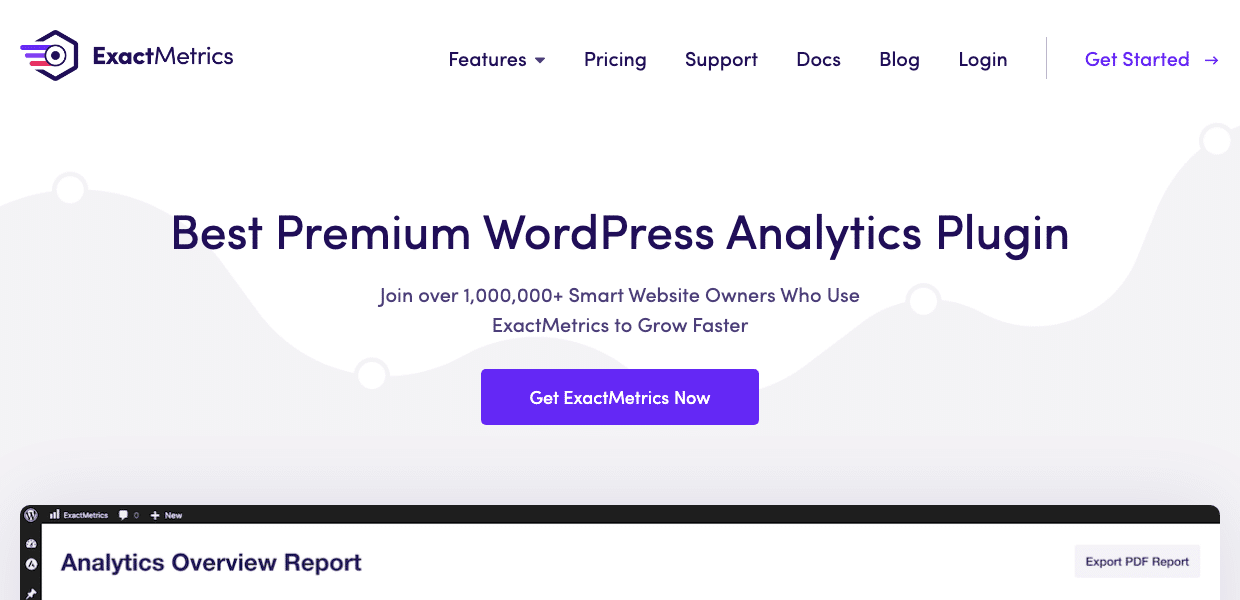
ExactMetrics is a Google Analytics plugin for WordPress that connects GA4 to your site without any coding. Beginner-friendly dashboard reports surface the stats that matter right inside your WordPress admin.
Automated tracking handles scroll depth, file downloads, eCommerce, and custom dimensions — without manually configuring tracking codes. The whole setup is handled by the plugin — no tag manager, no manual code, no developer required.
It covers the full tracking setup you’d need for most WordPress sites: eCommerce tracking for WooCommerce and Easy Digital Downloads, form conversion tracking for the most popular form plugins, a Search Console report that surfaces your top keywords directly in your dashboard, and 404 error detection so you can catch broken pages without digging through server logs. Enhanced link attribution gives you more accurate click data across outbound and internal links.
ExactMetrics has particularly strong traction with agencies and teams managing multiple WordPress sites — the licensing structure and multi-site management tools are well suited to that workflow, and the dashboard reporting is accessible enough for clients who aren’t analytics experts.
MY TAKE
ExactMetrics and MonsterInsights are closely matched on features — they share the same core pricing and a lot of the same functionality. The main difference is that MonsterInsights has Charlie Chat and a longer track record. If you’re already on ExactMetrics, there’s no urgent reason to switch. If you’re starting fresh, MonsterInsights edges it out.
PROS
- No coding required for GA4 setup
- Beginner-friendly dashboard reports
- Automated tracking including scroll depth and file downloads
- Custom dimensions tracking without manual setup
- Automatic 404 error tracking
- Free version available
CONS
- Advanced features require a paid plan
- No built-in AI assistant comparable to Charlie Chat
Get started with ExactMetrics today!
3. Google Site Kit

BEST FOR: WordPress site owners already using multiple Google tools who want a single integration for GA4, Search Console, and AdSense
KEY FEATURES: GA4, Google Search Console, AdSense, PageSpeed Insights, Core Web Vitals — all connected in one dashboard widget
PRICING: Free
FREE PLAN / TRIAL: Yes — completely free
Google Site Kit is Google’s official plugin for WordPress. It connects multiple Google products without editing any code — and it’s completely free. The tradeoff is that it’s limited. You get basic stats in your dashboard, but nothing close to the depth you’d get from MonsterInsights.
Site Kit’s value is the breadth of what it connects: Search Console keywords and page data, AdSense revenue, Core Web Vitals, and PageSpeed scores all show up from a single plugin.
The tradeoff is depth — each integration surfaces only headline-level numbers, so you’ll still need to open GA4, Search Console, or AdSense directly for any real analysis.
It’s a good fit if you want all your Google tools glanceable in one place. However, it’s not a substitute for a dedicated analytics plugin if you want to actually dig into the data.
For a full breakdown, check out MonsterInsights vs. Google Site Kit.
MY TAKE
Site Kit is fine for getting GA4 onto your site if budget is zero and your needs are minimal. But if you actually want to use your analytics data to grow — not just have it technically installed — you’ll outgrow Site Kit quickly.
PROS
- Official Google plugin — reliable and trustworthy
- Completely free, no paid tier
- Connects multiple Google services in one plugin
- No code editing required
- Lightweight and simple
CONS
- Very limited features beyond basic Google service connections
- Minimal dashboard reporting — no advanced tracking
- No eCommerce tracking, form tracking, or download tracking
- Requires additional plugins for anything beyond basic stats
Get started with Site Kit today!
4. Analytify
BEST FOR: Small WordPress sites that need a simple GA4 reporting dashboard without advanced tracking features
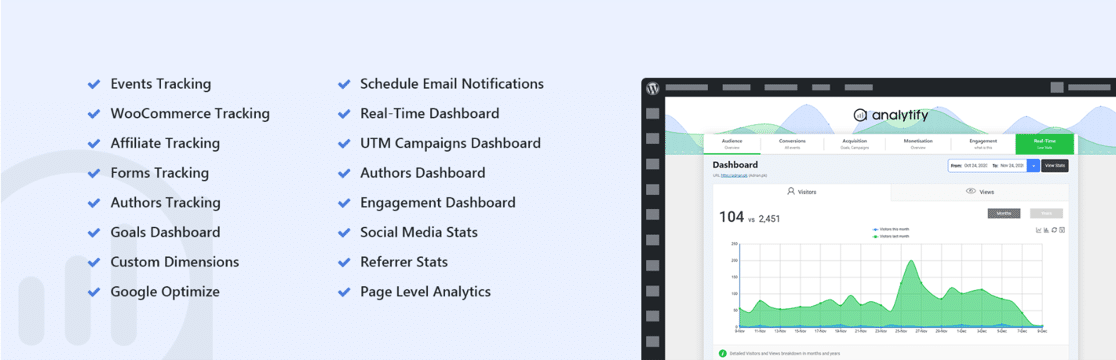
KEY FEATURES: GA4 dashboard reports, UTM campaign tracking, real-time stats, social media stats, WooCommerce add-on
PRICING: Free (limited); from $59/year (Starter)
FREE PLAN / TRIAL: Yes — limited free version on WordPress.org
Analytify is a solid option that brings Google Analytics data into your WordPress dashboard with a clean, easy-to-read interface. The free version includes page views, visitors, new vs. returning, top pages, and geographic data — and you can display these stats on the frontend of your site, which is a feature most other plugins don’t offer.
You can check our comparison of MonsterInsights vs. Analytify for more details.
It also supports page-level stats and addons for tracking WooCommerce and Easy Digital Downloads stores.
It also covers UTM campaign tracking, automated email reports, and WooCommerce and Easy Digital Downloads addons for stores that need basic eCommerce data without a heavier analytics setup.
MY TAKE
Analytify is a reasonable choice if you want clean reporting and the ability to show your stats publicly. It’s not as feature-rich as MonsterInsights, and the pro pricing is higher relative to what you get — but for sites that specifically want the frontend stats display, it’s worth considering.
PROS
- Clean, readable analytics interface
- Good free version with core metrics
- Unique frontend stats publishing feature
- Page-level stats for detailed content insights
- eCommerce addons available
CONS
- Premium pricing is higher than comparable competitors
- Fewer advanced tracking features than MonsterInsights
- No built-in AI assistant
Get started with Analytify today!
5. Conversios Analytics for WooCommerce
BEST FOR: WooCommerce stores that run Google Ads campaigns and need reliable conversion and product data in GA4
KEY FEATURES: Google Ads conversion tracking, GA4 eCommerce integration, product-level performance reporting, server-side tracking option
PRICING: Free core plugin; paid plans from $179/year
FREE PLAN / TRIAL: Yes — free core plugin available
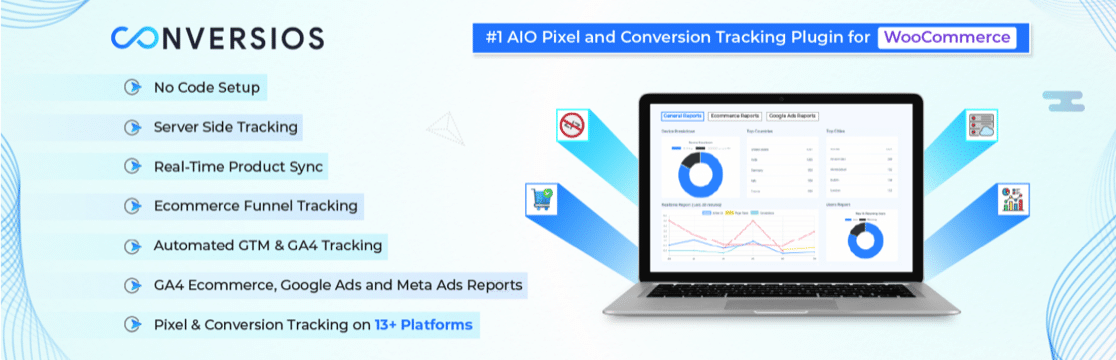
Conversios is built specifically for eCommerce analytics. It sets up Google Analytics for your WooCommerce store without coding, and tracks the metrics that matter to store owners: conversion rates, abandoned cart rates, impressions, and product clicks.
Where it stands out is ad pixel management. You can connect Google Ads, Meta, TikTok, Microsoft Ads, Pinterest, and a Google Merchant Center account — all from one plugin. If you’re running paid traffic to a WooCommerce store, that’s genuinely useful.
It also supports server-side tracking, which is more reliable for stores dealing with ad blockers. Worth noting: this is an eCommerce-only plugin. It doesn’t provide general site analytics or content reporting — if you need those alongside ad tracking, you’d need a second plugin.
MY TAKE
Conversios fills a specific niche well — WooCommerce stores running paid ads across multiple platforms. If that’s you, it’s worth a look. But if you want full-site analytics including content, forms, and deep WooCommerce reporting (revenue, AOV, top products, User Journeys), MonsterInsights covers all of that and more.
PROS
- Purpose-built for WooCommerce eCommerce tracking
- Free core plugin
- Multi-platform ad pixel support in one plugin
- Google Merchant Center integration
- No coding needed
CONS
- Limited to eCommerce sites — not useful for blogs or service sites
- No general website analytics dashboard
- Ad-tracking focus means limited content/SEO insights
Get started with Conversios today!
6. GA Google Analytics

BEST FOR: WordPress sites that need the simplest possible GA4 tracking code insertion with minimal overhead
KEY FEATURES: Lightweight GA4 tracking code insertion, configurable script position (header/footer), minimal plugin footprint
PRICING: Free
FREE PLAN / TRIAL: Yes — completely free
GA Google Analytics is as simple as it gets. Enter your Google Tag, choose a few options, and your tracking is live. No dashboard reports, no advanced tracking, no extras. For users who are comfortable navigating GA4 directly and just need a lightweight way to get the tag onto their site, this works perfectly.
There isn’t much to expand on here — the plugin injects the GA4 tracking tag and stays out of the way. Display advertising support, enhanced link attribution, and IP anonymization are available, with optional force SSL.
If you need actual analytics data, you’ll use GA4 directly; this plugin’s job is just reliable tag delivery.
MY TAKE
GA Google Analytics does exactly one thing: gets your tracking tag onto your site. If that’s genuinely all you need, it’s free and reliable. But most site owners need more than just code installation — they need reports, tracking, and data they can actually use.
PROS
- Simple and lightweight — minimal site overhead
- Easy setup: add tag, choose options, done
- Free; Pro is only $15/year
- IP anonymization included
CONS
- No WordPress dashboard reports
- No advanced tracking (downloads, forms, eCommerce, outbound links)
- You need to use GA4 directly to see any data
Get started with GA Google Analytics now!
Honorable Mention: WPCode
If all you need is to install the Google Analytics code snippet on your site, WPCode is the safest way to do it. It adds code snippets to your site’s header or footer without touching theme files — so the code stays put when you update or switch themes.

BEST FOR: WordPress developers who need to inject custom code snippets, tracking scripts, or headers/footers without a file editor
KEY FEATURES: Code snippet manager, header/footer injection, GA4 and pixel snippet support, conditional logic for display rules
PRICING: Free (core); from $49/year (Basic)
FREE PLAN / TRIAL: Yes — free core plugin on WordPress.org
It’s a good fallback option if you want minimal overhead and plan to view your data directly in GA4.
Free vs. Paid Google Analytics Plugins: How to Choose
Whether a free or paid plugin is right for you comes down to what you actually need from your data — and how much of your time it’s worth.
If you run a blog or content site, the data you care about most is your top landing pages, engagement rate, top traffic sources, and what content drives return visitors. A paid plugin like MonsterInsights surfaces all of that inside WordPress. You’re not logging into GA4 to piece it together manually.
If you run a WooCommerce store, the stakes are higher. You need revenue, conversion rate, average order value, top products, and abandoned funnels. MonsterInsights delivers all of this with one-click setup. The User Journeys report shows every page each customer visited before buying — so you know exactly which traffic sources drive your sales.
Free options like Google Site Kit or GA Google Analytics are fine if you know GA4 well and don’t mind navigating it directly. They get tracking onto your site — nothing more.
Paid plugins like MonsterInsights tend to pay for themselves. The eCommerce Report, User Journeys, and Form Conversion Report all show you where you’re losing revenue. Charlie Chat lets you ask a quick question and get an actionable answer — without spending an hour in GA4.
What’s the Best Google Analytics Plugin for WordPress?
For most WordPress site owners, MonsterInsights is the clear pick. It covers setup, dashboard reporting, advanced tracking, eCommerce, forms, and Search Console integration — without any coding required.
It cuts the time you spend navigating GA4. Instead of digging through reports, you see what matters right in your dashboard. Charlie Chat takes that further — ask it a question about your traffic, content, or WooCommerce revenue and you get a specific answer with a recommended next step, right there.
ExactMetrics is a strong option for agencies and teams managing multiple WordPress sites. If you only need basic GA4 installation and are comfortable in the GA4 interface, GA Google Analytics or WPCode will do the job for free. And if you’re a WooCommerce store running multiple ad platforms, Conversios is worth a look.
But if you want analytics you’ll actually use — data you can see, understand, and act on without a GA4 learning curve — MonsterInsights is where to start.
For more detail, see MonsterInsights vs. Google Site Kit, MonsterInsights vs. Analytify, and MonsterInsights vs. GA Google Analytics.
Start Seeing Your GA4 Data Where You Already Work
MonsterInsights connects in a few clicks and puts your most important analytics right inside your WordPress dashboard — no GA4 navigation required.
Get MonsterInsights Free →Video Tutorial: Best Google Analytics Plugins for WordPress
FAQs About Google Analytics WordPress Plugins
What is the best free Google Analytics plugin for WordPress?
MonsterInsights has the best free tier — the Lite version on WordPress.org connects GA4 without any code and shows basic traffic stats inside your WordPress dashboard. Google Site Kit is also completely free and adds Search Console, AdSense, and PageSpeed alongside GA4. For pure analytics in your dashboard, MonsterInsights Lite is the stronger starting point; Site Kit makes more sense if you’re already using multiple Google tools and want them all in one place.
What is the best Google Analytics plugin for WooCommerce?
MonsterInsights is the best choice for WooCommerce. It includes a dedicated eCommerce Report showing total revenue, conversion rate, average order value, and top traffic sources for sales — all inside WordPress. The User Journeys report goes a step further: it shows every page a customer visited before completing a purchase, including UTM attribution so you can see which campaigns actually drive sales. Setup is one click for WooCommerce with no code required. Conversios is worth considering if you also run Google Ads and need conversion tracking and product feed management in the same plugin.
Do I need to use a Google Analytics WordPress plugin?
No — you can add GA4’s tracking code manually by pasting it into your theme’s header. But a plugin makes setup significantly easier, keeps the tracking code in place through theme updates, and (depending on which plugin you use) surfaces the data you actually care about inside WordPress so you don’t need to log into GA4 separately. For most site owners, the time saved on setup and the convenience of in-dashboard reporting makes a plugin worth using.
Is Google Analytics free for WordPress?
Yes — Google Analytics 4 itself is completely free. The cost question is really about the WordPress plugin you use to connect it. Several plugins in this list are free (Google Site Kit, GA Google Analytics, and others), and most paid plugins like MonsterInsights and Analytify have free versions on WordPress.org. Paid tiers unlock more advanced features like eCommerce reporting, form tracking, and AI-powered analytics, but the basic GA4 connection costs nothing.
What is the difference between MonsterInsights and Google Site Kit?
Both connect GA4 to WordPress without code and require no developer help. The difference is depth and scope. Site Kit is free and brings multiple Google services — GA4, Search Console, AdSense, PageSpeed Insights — into one plugin, but each connection is surface-level. MonsterInsights focuses entirely on making GA4 data actionable: you get detailed dashboard reports, automatic event tracking, eCommerce and form conversion tracking, User Journeys, Search Console keywords, and Charlie Chat — an AI assistant built into the Reports screen. If you use multiple Google tools and want a single integration, Site Kit covers the basics. If you want to actually understand and act on your analytics without leaving WordPress, MonsterInsights goes much further.
Does MonsterInsights have AI features?
Yes — MonsterInsights includes Charlie Chat, a built-in AI assistant available to all users, including the free Lite version. You access it from the icon in the bottom-right corner of the Reports screen. Ask it a question about your site’s traffic, content performance, or WooCommerce revenue and it returns a specific answer pulled from your GA4 data, along with a recommended next step and a direct link to the relevant report. Charlie Chat replaced the previous AI Insights and Conversations AI features, which have both been retired.
I hope this article helped you find the best Google Analytics plugin for your WordPress site. If you liked this article, check out the following guides:
- How to Set Up Google Analytics in WordPress
- Google Analytics vs. Mixpanel vs. MonsterInsights
- Your Ultimate Guide to MonsterInsights Dashboard Reports
- Best WordPress Plugins and Tools for Marketers
- Types of Google Analytics Reports to Grow Your Business
Follow us on Twitter, Facebook, and YouTube for more Google Analytics tips.