


Your WooCommerce store is generating data every single day. But if you can’t see it clearly, you’re making decisions in the dark — guessing which products to promote, which traffic sources are working, and why revenue fluctuates week to week.
We’ve reviewed dozens of WooCommerce analytics tools over the years. The plugins on this list were picked based on real criteria: installs, ratings, active development, features, and ease of use. Whether you need full GA4 eCommerce reporting or just a better product sales breakdown, there’s a tool on this list that fits your situation.
Here are the 6 best WooCommerce analytics and reporting plugins — starting with the most capable option for store owners who want everything in one place.
In This Article:
- WooCommerce Reporting & Analytics: The Basics
- 6 Best WooCommerce Analytics and Reporting Plugins
- 1. MonsterInsights — Best for WooCommerce Analytics Inside WordPress
- 2. Conversios.io — Best for Google Shopping Analytics and Ad Tracking
- 3. Google Analytics for WooCommerce — Best for Free GA4 Event Tracking
- 4. Ninjalytics — Best for Sales Reports and Order Export
- 5. Booster for WooCommerce — Best for All-in-One WooCommerce Feature Packs
- 6. Metorik — Best for Advanced Reporting and Customer Segmentation
- A Quick Overview of the Best WooCommerce Analytics Plugins
- Which WooCommerce Analytics Plugin Should You Use?
- FAQs About WooCommerce Analytics Plugins
WooCommerce Reporting & Analytics: The Basics
For any online business, data is incredibly important, and WooCommerce stores are no exception.
Tracking analytics in your WooCommerce store is not just a nice-to-have feature. It’s an essential piece of the marketing puzzle that can make the difference between a thriving eCommerce store and one that struggles to grow.
WooCommerce analytics give you invaluable insight into your store’s performance, customer behavior, and overall business health. By keeping your eye on your most important key eCommerce metrics, you can make data-driven decisions to optimize your products, improve user experience, and boost sales.
Whether you’re working on increasing conversion rates, identifying top-selling products, or understanding your customers’ purchasing patterns, analytics tools give you the information you need to steer your store in the right direction.
Should you use the built-in WooCommerce analytics reports?
WooCommerce comes equipped with a built-in analytics dashboard that provides store owners with essential insights into their online business. In the dashboard, you’ll find a handful of your store’s key metrics, such as total sales, number of orders, orders per category, store visits and views, and products sold.
While the built-in analytics are valuable for day-to-day operations, they may not offer the deeper insights that growing businesses need. For example, where are your purchasers coming from? Did they find you via organic search, or did they click on your site from a social media platform?
This is where third-party WooCommerce analytics plugins come into play. They extend the capabilities of your store’s analytics and provide more advanced features so you can get the data that matters most for your business growth.
So, let’s take a look at the best WooCommerce analytics plugins!
6 Best WooCommerce Analytics and Reporting Plugins
Before we launch into our list of plugins, here’s a quick overview of how we chose them.
How We Chose the Best WooCommerce Reporting Plugins
We used a set of criteria for choosing the plugins on this list, including:
- Popularity: How many installs do the plugins have?
- Rating: Do the plugins have good ratings?
- Upkeep: You should never install an outdated plugin that’s not being constantly evaluated for security issues. Always look for plugins with active developers.
- Features: Does the plugin have helpful features? If it’s a paid plugin, do the features match up with the pricing?
- And finally, Ease of Use: Is the plugin or tool easy enough to use for someone without a lot of experience and time to learn a complicated plugin?
Here are our favorite WooCommerce reporting plugins, starting with MonsterInsights.
1. MonsterInsights — Best for WooCommerce Analytics Inside WordPress

BEST FOR: WooCommerce store owners who want GA4 analytics inside WordPress without touching GA4
KEY FEATURES: eCommerce Report (revenue, conversion rate, top products), User Journeys, Charlie Chat, Coupons Report, 1-click WooCommerce setup
PRICING: From $199.50/year (Pro) — eCommerce features require Pro tier
FREE PLAN / TRIAL: Lite version available on WordPress.org; eCommerce features require Pro
MonsterInsights is the WordPress analytics plugin built for WooCommerce store owners who want their most important data without ever opening GA4.
It connects WooCommerce with Google Analytics and surfaces your store’s performance directly inside your WordPress dashboard.
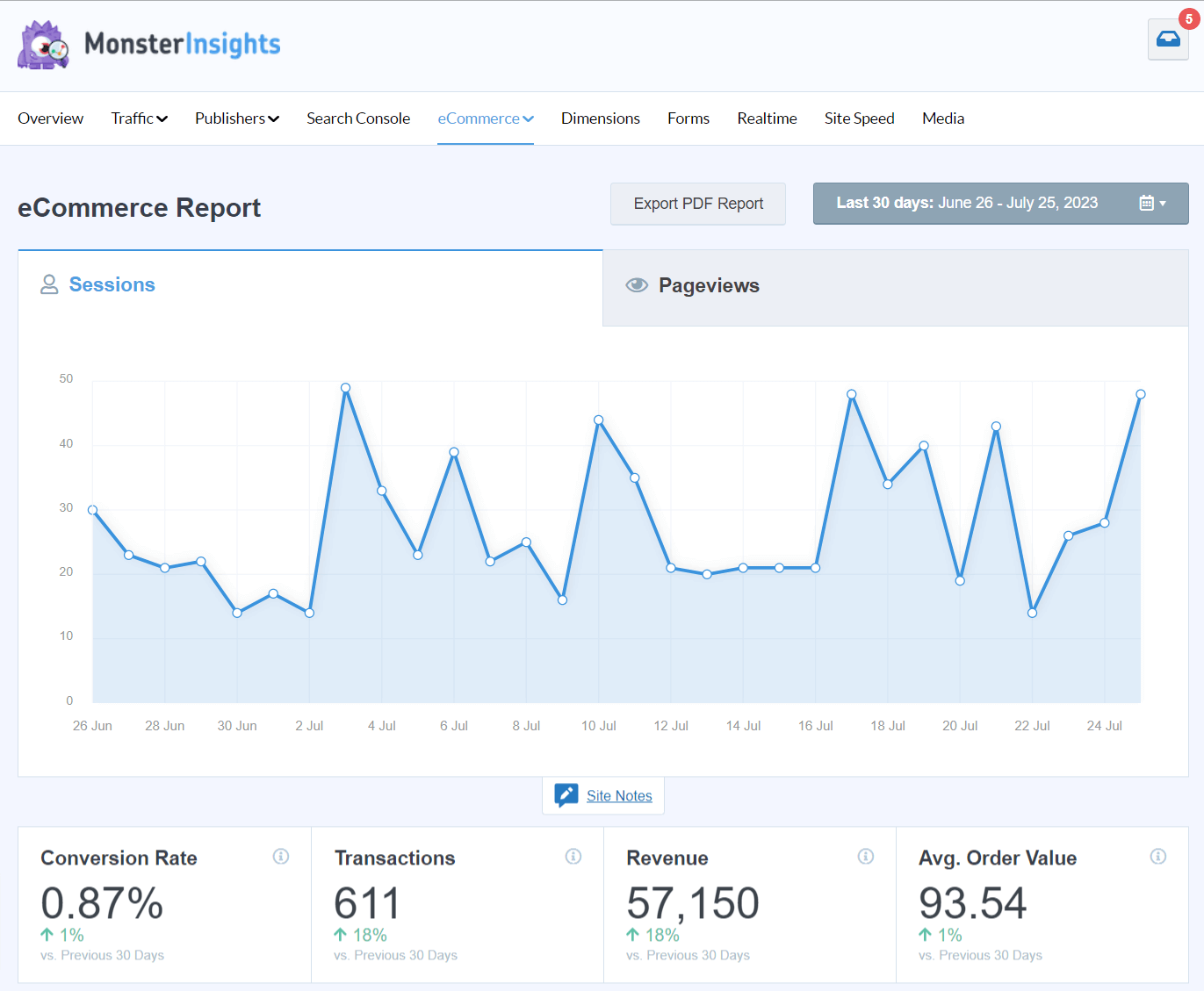
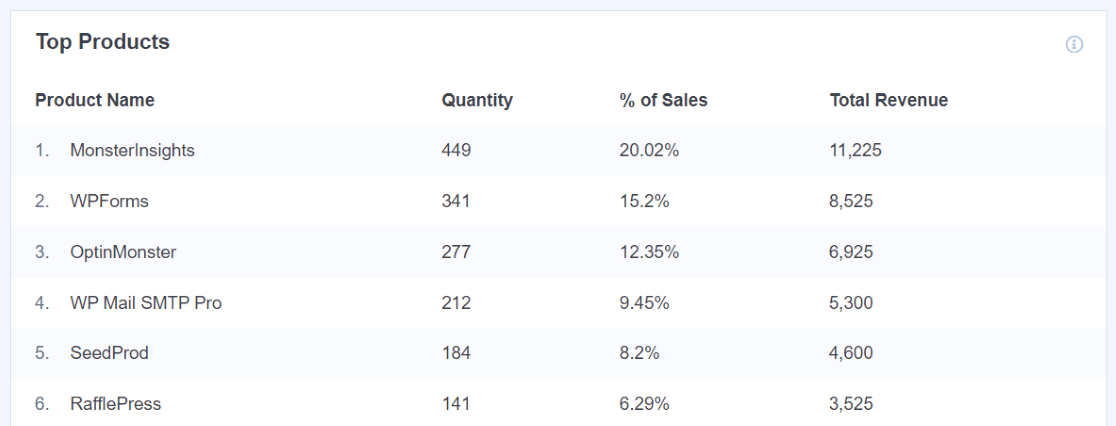
You’ll get your overall store stats, plus more reports like top products:
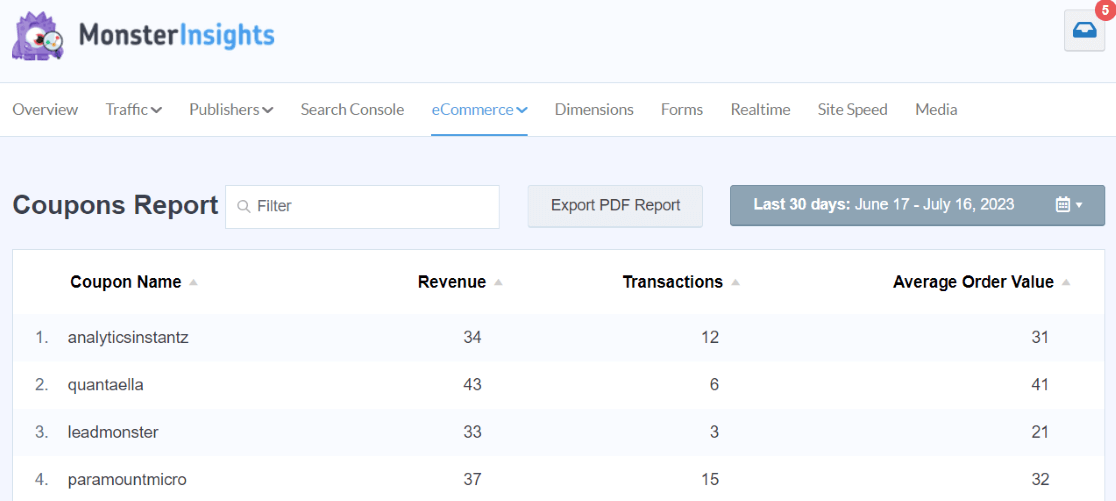
And Coupons:
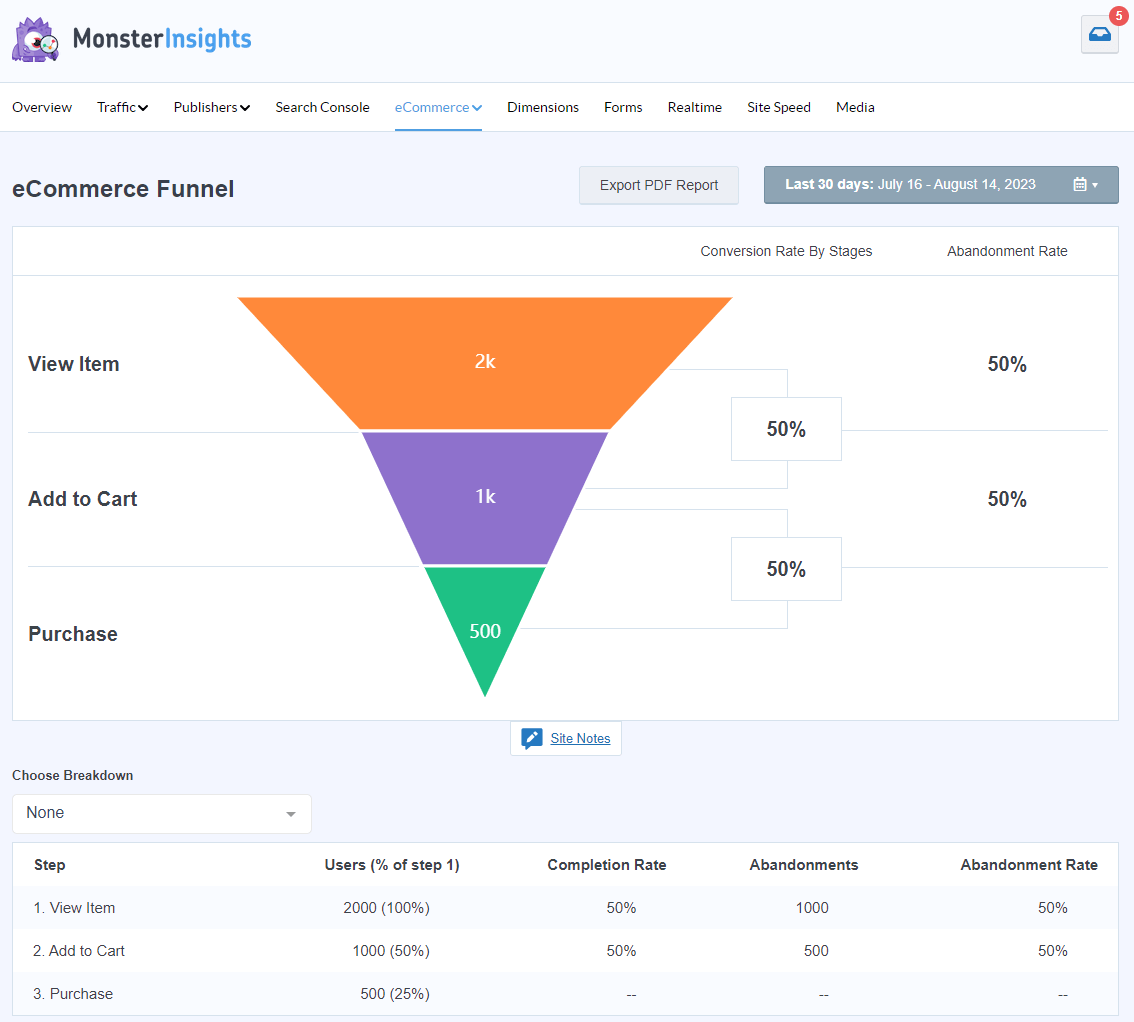
And even a conversion funnel:
Plus, setting up Google Analytics eCommerce tracking in MonsterInsights is as easy as clicking a button:
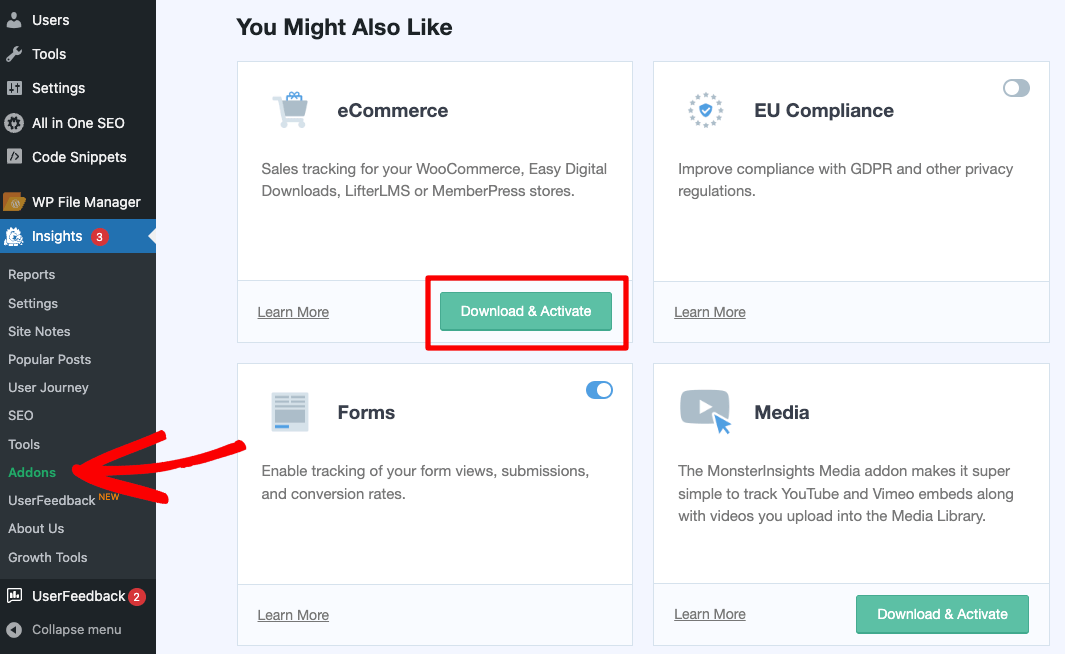
Beyond eCommerce, you can also set up sophisticated tracking features such as event tracking, form tracking, custom dimension tracking, outbound link tracking, media tracking, and much more.
Every completed purchase also generates a user journey report — a full page-by-page path of every step the customer took before checking out. That attribution is difficult to get from GA4 alone, and it changes how you think about your content and product pages.
There’s also a Popular Products widget that pulls your best-sellers and lets you display them anywhere on your site without custom code.
On the advertising side, Google Ads conversion tracking and Meta Pixel installation are both handled directly from the plugin — no theme edits required.
Charlie Chat is available to every user, including Lite: ask a question about your store’s performance in plain English and get a specific answer without digging through reports.
MY TAKE
I’d reach for MonsterInsights first if you’re running a WooCommerce store and want to understand your data without ever logging into GA4. The eCommerce report — revenue, conversion rate, top products, all in one place inside WordPress — is worth the Pro upgrade on its own. User Journeys is the feature I find most underrated: seeing every page a customer visited before purchasing changes how you think about your content and your funnel.
PROS
- 1-click WooCommerce setup, no developer needed
- Full eCommerce report inside WordPress dashboard (revenue, AOV, top products, best traffic sources)
- User Journeys shows every page visited before a purchase
- Charlie Chat for instant answers about your store data — no report navigation required
- Popular Products widget to surface bestsellers on any page
- Goes beyond WooCommerce: tracks forms, campaigns, outbound links, and more
CONS
- eCommerce features require Pro plan ($199.50/year)
- Requires a connected GA4 property (not a standalone platform)
- Higher price point than simpler free options on this list
Get started with MonsterInsights today!
Key Takeaway
MonsterInsights is the only plugin on this list that shows you your full GA4 eCommerce report — revenue, conversion rate, top products, best traffic sources — without requiring you to log into GA4. The User Journeys report shows you every page a customer visited before purchasing, which changes how you think about both your content and your funnel. If you’re running a WooCommerce store and want to understand your data without learning GA4, this is where to start.
2. Conversios.io — Best for Google Shopping Analytics and Ad Tracking
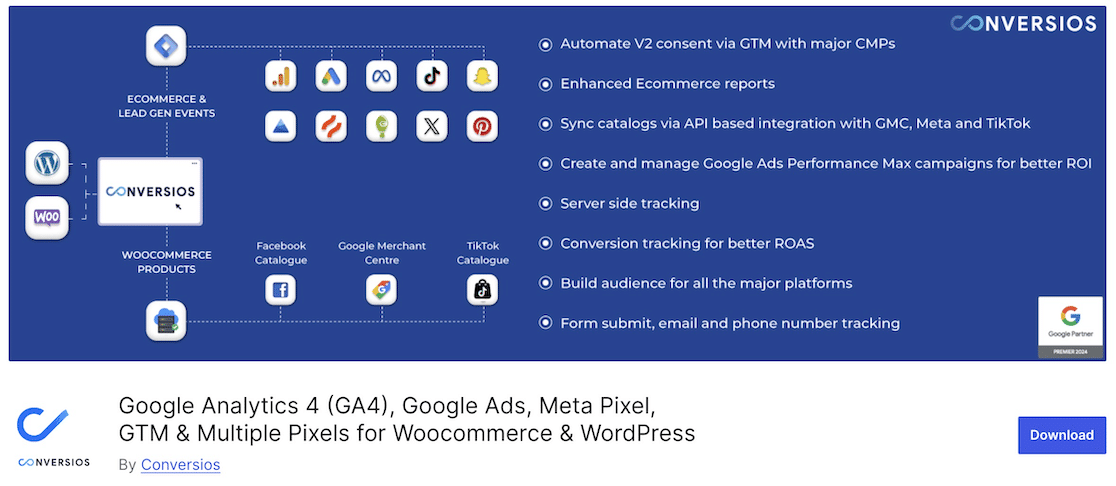
BEST FOR: WooCommerce stores running Google Shopping campaigns who want analytics and ad tracking in one plugin
KEY FEATURES: eCommerce conversions report, Google Shopping integration, abandoned cart tracking, multi-platform pixel support (Meta, TikTok, Pinterest), Google Ads conversion tracking
PRICING: Free version available; paid plans from $89.10/year
FREE PLAN / TRIAL: Yes — free version on WordPress.org
Conversios.io is built for WooCommerce stores that are heavily invested in Google Shopping. It covers GA4 eCommerce event tracking, ad platform integrations, and abandoned cart tracking under one roof.
Beyond the GA4 event layer, Conversios has its own reporting: an eCommerce conversions report, product placement performance data, and view-to-cart and view-to-conversion ratios that show you where shoppers are dropping off before they buy. Audience and behavior reports are included as well.
If you’re running Google Shopping campaigns, Conversios lets you connect and manage them directly from WordPress — making it a single control point for both your GA4 tracking and your Google Ads attribution.
Conversios connects with many different plugins, platforms, and tools, but make sure to check whether the feature you want is available in the free version. Although many features are listed on their WordPress page, some of those features aren’t found in the free version — only the Starter version and up.
MY TAKE
I’d consider Conversios if your store is heavily invested in Google Shopping and you want tracking and campaign management in one plugin. It’s more specialized than MonsterInsights — less focused on WordPress dashboard reporting, more focused on ad platform integrations. For stores that aren’t running Google Shopping, the free version is a solid starting point for basic GA4 eCommerce events.
PROS
- Free version available on WordPress.org
- Strong Google Shopping integration
- Multi-platform pixel support (Meta, TikTok, Pinterest, LinkedIn)
- Abandoned cart tracking included
CONS
- Many advertised features require the paid Starter plan or above
- Less in-WordPress dashboard reporting compared to MonsterInsights
- Free version limitations aren’t clearly communicated upfront
Get started with Conversios.io today!
3. Google Analytics for WooCommerce — Best for Free GA4 Event Tracking

BEST FOR: Budget-conscious store owners who only need GA4 eCommerce event tracking and are comfortable reading data in GA4
KEY FEATURES: GA4 eCommerce event tracking, maintained by Automattic/WooCommerce team, simple one-step setup
PRICING: Free
FREE PLAN / TRIAL: Yes — completely free on WordPress.org
Google Analytics for WooCommerce is the free plugin created by the WooCommerce team to connect your store with Google Analytics. It does one thing: push the right eCommerce events to GA4. There’s no in-WordPress reporting — all your analysis happens directly in GA4.
There are over 200,000 active installations. Be advised that there are some mixed reviews recently about plugin stability. If you simply want eCommerce tracking in GA4 and don’t need additional reporting features, this plugin may be a good fit.
MY TAKE
I’d use this only when budget is the deciding factor and the store owner is comfortable reading eCommerce data directly in GA4. It does one thing — pushes the right eCommerce events to GA4 — and does it reliably. The trade-off: you get no in-WordPress reporting dashboard, so all your analysis happens in GA4 itself.
PROS
- Completely free
- Maintained by the Automattic/WooCommerce team
- Simple setup for basic GA4 eCommerce event tracking
CONS
- No in-WordPress reporting dashboard — all data analysis happens in GA4
- Requires GA4 familiarity to interpret the data
- Mixed recent reviews on WordPress.org
Get started with Google Analytics for WooCommerce now.
Want all your WooCommerce data inside WordPress?
MonsterInsights shows your revenue, conversion rate, top products, and best traffic sources — all in your WordPress dashboard. No GA4 required. Setup takes about 2 minutes.
Get MonsterInsights Pro4. Ninjalytics — Best for Sales Reports and Order Export
BEST FOR: Store owners who need visual WooCommerce sales reports with pre-built templates they can share with their team or clients
KEY FEATURES: 15+ pre-built report templates, interactive sales charts, per-product and category breakdowns, order export (CSV), runs inside WordPress dashboard
PRICING: Free version available; Pro plan unlocks advanced templates
FREE PLAN / TRIAL: Yes — free on WordPress.org
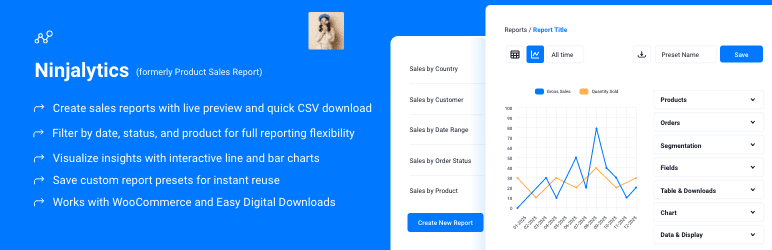
Ninjalytics (formerly Product Sales Report for WooCommerce) is a WooCommerce reporting plugin focused on visual analytics that lives entirely inside your WordPress dashboard.
Rather than pushing you toward an external analytics platform, it works directly from your WooCommerce order data and surfaces the results as interactive charts and formatted reports.
The plugin ships with 15+ pre-built report templates covering top-selling products, revenue by category, order volume trends, and more.
Reports render as charts rather than raw data grids, which makes sharing with a client or non-technical team member considerably easier than exporting a spreadsheet. When you do need raw data, order export to CSV is built in.
MY TAKE
I’d reach for Ninjalytics when a store owner needs to understand what’s selling — by product, category, or date range — without touching GA4. It’s particularly useful for stores that produce regular sales reports for stakeholders or clients. That said, it’s purely order-level reporting: it won’t tell you where buyers came from or which campaigns drove conversions. Pair it with MonsterInsights if you need both.
PROS
- Free to start with a solid set of pre-built templates
- Interactive charts make data easier to read and present
- 15+ templates cover the most common WooCommerce reporting needs
- Runs entirely inside WordPress — no external platform required
CONS
- No GA4 or marketing attribution — purely WooCommerce order data
- No traffic source or conversion tracking
- Advanced report templates require the Pro plan
Get started with Ninjalytics today!
5. Booster for WooCommerce — Best for All-in-One WooCommerce Feature Packs

BEST FOR: WooCommerce stores that want 100+ plugin addons in one package, with reporting as one of many features
KEY FEATURES: 100+ WooCommerce addons, monthly sales reports, customer-by-country reports, stock reports, currency conversion reports
PRICING: Free / paid plans available
FREE PLAN / TRIAL: Yes — free version on WordPress.org
Booster for WooCommerce is a plugin with 100+ different addons you can activate for your store. The WooCommerce Reports addon generates additional native store reports that go beyond what WooCommerce includes by default.
Reports this plugin adds to WooCommerce:
- Product Sales
- Monthly Sales (with currency conversions)
- Customers by Country
- Customers by Country Sets
- All in Stock with Sales Data
- Understocked Products
- Overstocked Products
Please note that you will have to purchase the personal license for the reporting module.
MY TAKE
I’d use Booster if I needed multiple WooCommerce enhancements and the reporting module was a bonus — not if analytics was the primary need. The reports are WooCommerce-native (sales, stock, customer geography) rather than GA4-connected, so you won’t get marketing attribution or user behavior data. If you’re already paying for Booster for its other features, the reports are a useful addition.
PROS
- Massive addon library (100+ features beyond just reporting)
- Free version available
- Customer geography and stock reporting included
CONS
- Analytics features are WooCommerce-only — no GA4 connection
- Reporting module requires paid personal license
- Overkill if you only need analytics
Get started with Booster for WooCommerce today!
6. Metorik — Best for Advanced Reporting and Customer Segmentation
BEST FOR: Established WooCommerce stores that need advanced reporting, customer segmentation, and email automation in one platform
KEY FEATURES: Custom report dashboards, cashflow reporting, customer segmentation, abandoned cart email automation, 100s of KPIs, sales breakdown by device/source/time
PRICING: Based on monthly order volume; free trial available
FREE PLAN / TRIAL: Free trial available — no permanent free plan
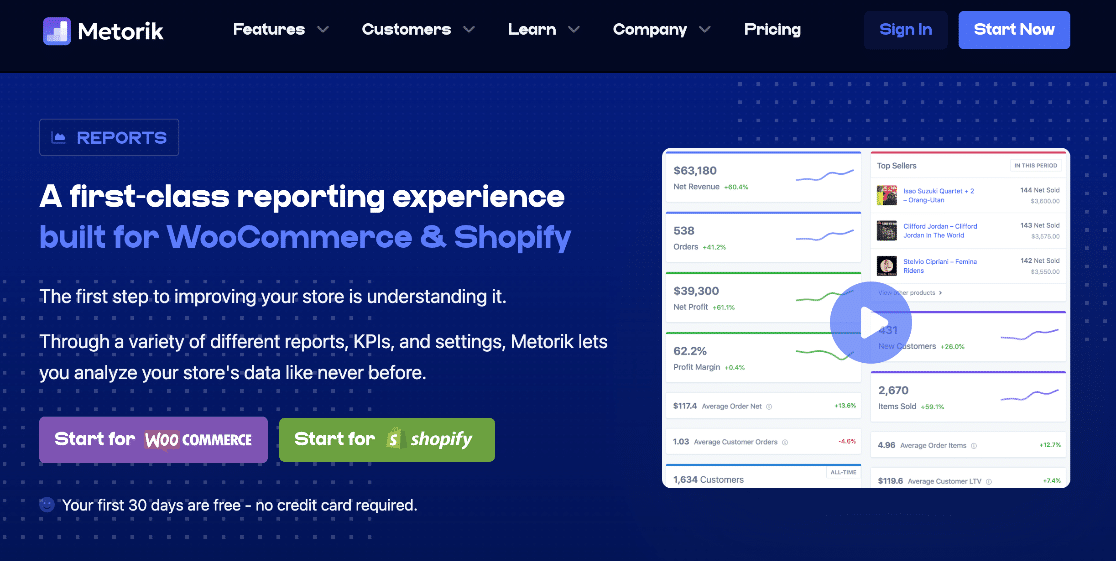
Metorik is a standalone platform — separate from WordPress — that connects to your WooCommerce store for advanced reporting, customer segmentation, and email marketing automation. It goes well beyond simple reporting and is best suited for stores that have outgrown the built-in WooCommerce dashboard.
Here are some of the key reporting features:
- Custom report dashboards
- Quickly see your cashflow and then drill down into who is making your orders, when they are ordering, and how much they are spending
- Reports on revenue, profit, orders, refunds, devices, sources, and more
- Individual customer pages
- 100s of reports and KPIs
You can try Metorik for free, but after that, pricing is based on how many sales you make per month.
MY TAKE
I’d suggest Metorik to stores that have outgrown basic WooCommerce reporting and need a standalone analytics platform. It’s genuinely powerful for segmenting customers and understanding profit margin, not just revenue. The pricing model scales with order volume, which keeps it accessible at low volume but can add up as the store grows. Best suited for stores already thinking about email automation alongside analytics.
PROS
- Standalone platform with deep reporting capabilities (not just a WordPress plugin)
- Advanced customer segmentation and cohort analysis
- Abandoned cart email automation built in
- Highly customizable dashboards
CONS
- External platform — analytics don’t live inside WordPress dashboard
- Pricing scales with order volume (can get expensive at high volume)
- Steeper learning curve than simpler plugin options
Get started with Metorik today!
A Quick Overview of the Best WooCommerce Analytics Plugins
Not sure which plugin fits your situation? Here’s how all six compare at a glance.
| PRODUCT NAME | BEST FOR | STARTING PRICE |
|---|---|---|
| MonsterInsights | WooCommerce analytics inside your WordPress dashboard, without touching GA4 | From $199.50/year (Pro) |
| Conversios.io | Google Shopping analytics and multi-channel ad tracking | Free / paid plans available |
| Google Analytics for WooCommerce | Free GA4 eCommerce event tracking for budget-conscious store owners | Free |
| Ninjalytics | Visual WooCommerce sales reports with 15+ templates and order export | Free / Pro plan available |
| Booster for WooCommerce | 100+ WooCommerce feature addons in one package, with reporting included | Free / paid plans available |
| Metorik | Advanced reporting, customer segmentation, and email automation | Based on order volume; free trial available |
Which WooCommerce Analytics Plugin Should You Use?
The best plugin depends on what you actually need from your analytics. Here’s how to choose.
If you want to see your WooCommerce data without ever logging into GA4: MonsterInsights is the obvious pick. It connects your store to GA4 and surfaces everything — revenue, conversion rate, top products, best traffic sources — right inside your WordPress dashboard. The User Journeys report alone is worth it: you can see every page a customer visited before purchasing.
If you run Google Shopping campaigns and need analytics and ad tracking in one plugin: Conversios.io handles both GA4 eCommerce tracking and Shopping integration, plus multi-platform pixel support for Meta, TikTok, and Pinterest. The free version is a solid starting point for smaller stores.
If budget is the deciding factor and you’re comfortable reading data in GA4: Google Analytics for WooCommerce is free, maintained by Automattic, and reliably pushes eCommerce events to GA4. You won’t get an in-WordPress reporting dashboard, but the tracking itself is solid.
If you need visual sales reports with pre-built templates you can share with your team or clients: Ninjalytics is built for this. It comes with 15+ chart-based report templates covering top products, category revenue, and order trends — all exportable to CSV without touching an analytics platform.
If you want 100+ WooCommerce feature modules with reporting included: Booster for WooCommerce is the all-in-one option. The reporting features are one module among many — useful if you’re already using Booster for checkout customizations or currency switching and want basic sales data without adding another plugin.
If you want advanced reporting, customer segmentation, and email automation as a standalone platform: Metorik is the choice for established stores that have outgrown basic plugin analytics. It runs outside WordPress and includes cohort analysis, customer lifecycle tracking, and automated campaigns triggered by purchase behavior.
Stop flying blind on your WooCommerce data
MonsterInsights connects your WooCommerce store to GA4 in minutes and puts your most important eCommerce data right inside WordPress. See which products are selling, where your buyers are coming from, and where people are dropping off — no GA4 required.
Get MonsterInsights Pro TodayFAQs About WooCommerce Analytics Plugins
What is the best WooCommerce analytics plugin?
MonsterInsights is the most comprehensive WooCommerce analytics plugin for store owners who want their data inside WordPress. It connects your store to GA4 and shows you revenue, conversion rate, top products, best traffic sources, and individual user journeys — all without opening GA4. For stores focused on Google Shopping, Conversios.io is a strong alternative. For advanced standalone reporting and email automation, Metorik is worth considering.
Does WooCommerce have built-in analytics?
Yes. WooCommerce includes a built-in analytics dashboard with basic store metrics: total sales, orders, products sold, store visits, and orders by category. It’s useful for day-to-day operations. But it doesn’t show you where your buyers came from, how they navigated your site, or which marketing efforts are driving revenue. That’s where third-party analytics plugins add significant value.
Do I need Google Analytics for my WooCommerce store?
You don’t strictly need it, but connecting your store to Google Analytics (GA4) gives you data that WooCommerce alone can’t provide: traffic sources, customer behavior across sessions, conversion funnels, and attribution. If you want to know which marketing channels are driving revenue — not just how many orders you received — GA4 eCommerce tracking is essential. Setting it up with MonsterInsights takes about 2 minutes.
What WooCommerce data can I track in Google Analytics?
With GA4 eCommerce tracking enabled, you can track: total revenue, conversion rate, average order value, add-to-cart events, product views, checkout steps, coupon usage, top products, best traffic sources, and more. MonsterInsights surfaces all of this inside WordPress so you don’t have to navigate GA4 to find it. You can also see the full customer journey — every page a buyer visited before completing their purchase.
Is there a free WooCommerce analytics plugin?
Yes, several options on this list have free versions. Google Analytics for WooCommerce is completely free and handles basic GA4 eCommerce event tracking. Conversios.io and Product Sales Report for WooCommerce also offer free versions on WordPress.org. MonsterInsights has a free Lite version — though its eCommerce reporting features (revenue, conversion rate, top products) require the Pro plan. The right choice depends on whether you need in-WordPress reporting or are comfortable working directly in GA4.
How do I track WooCommerce sales without leaving WordPress?
MonsterInsights is the best option for this. It connects WooCommerce to GA4 and then surfaces your eCommerce data — revenue, top products, conversion rate, coupon usage, traffic sources — right inside your WordPress dashboard. You also get a conversion funnel report and user journey tracking for every purchase. No GA4 login needed.
That’s our list of the best WooCommerce analytics and reporting plugins for WordPress! We hope you found the best tool(s) for your store.
Here are a few more WooCommerce articles we think you’d like:
- Top eCommerce Metrics & KPIs to Track in Google Analytics 4
- Best WooCommerce Plugins & Extensions
- WooCommerce SEO Tips to Boost Your Traffic and Sales
- How to Set Up WooCommerce Google Ads Conversion Tracking
- How to Make a WooCommerce Site GDPR Compliant
Follow us on Twitter, Facebook, and YouTube for more Google Analytics tips.